QUICK FACTS:
+ Jet diameter: 0.03"
+ Max area: 26" X 42"
OMAX Layout:
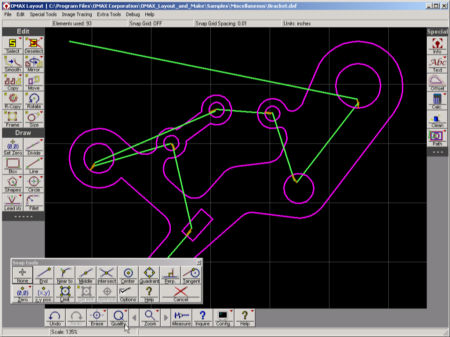
+ cam.py doesn't add lead i/o so use OMAX Layout for now...
+ reads .dxf or .ord
+ when cutting smaller than 1"sq. leave a small tab so it doesn't sink in the water...
+ Need to add lead ins and lead outs for all cuts to prevent unfinished cuts.
+ set [Quality] > [All]
+ [Lead I/O] > [Autopath] to automatically generate lead i/os & traverses
+
right-click [Lead I/O]
> [Erase leads & traverses] to delete them
+ use [v style with traverse] to manually create lead i/o and traverses
+ manually erase with the [Erase] button.
+ [Clean] > [Remove gaps] to remove gaps
+ right-click [Divide] > click to add points
+ right-click [Path] > [Automatically generate] custom toolpath to tweak, set offset to 0.015"
+ save as .ord
OMAX Make:
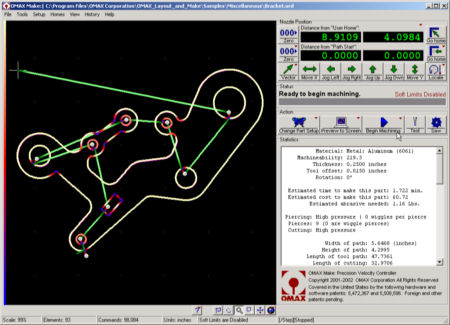
+ [nest] to duplicate shape on area
+ select material (*setting for alluminum is 6061)
+ set thickness
+ set offset to 0.015"
+ wiggles set to high, press [space] when it is cutting to set appropriate settings
Water-jet cutter:
+ To etch and cut: use water & garnet
+ To scribe (etch thin & fragile materials) use water only
+ hold the piece down
+ set the z0: unlock lever at left, turn clockwise until it blocks then backup 3/4 turn, lock lever
+ move head with arrows on keyboard
+ on OMAX Make click the lowest [000] to set origin
+ raise water level with the handle on right of computer to ~2cm over material
+ turn yellow water valve upwards
+ [Begin Machining]