Ok for this week, I wanted to connect my octopus to my phone (I am doing this during final project week) but I have been having trouble with the wifi connection.
Here is my ChatGPT conversation.
I started by trying to use my ESP32S3 in my octopus to see the distance sensor readings on my phone and connect via wifi. So I uploaded some code to connect, the Wifi would show up on both my computer and phone, i would input the password, but then it would fail. It seems it is a frequency issue, like the ESP32 is at a lower GHz than the phone is? but still not sure why.
This is the first code I tried to connect to WIFI on my phone
#include
#include
#include
#include
#include
#include
#include
// ===================== WIFI (phone connects to ESP32-S3 directly) =====================
const char* AP_SSID = "S3_ToF";
const char* AP_PASS = "12345678"; // 8+ chars
WebServer server(80);
// ===================== OLED =====================
#define SCREEN_WIDTH 128
#define SCREEN_HEIGHT 64
#define OLED_ADDR 0x3C
Adafruit_SSD1306 display(SCREEN_WIDTH, SCREEN_HEIGHT, &Wire, -1);
// ===================== VL53L5CX =====================
SparkFun_VL53L5CX myImager;
// Optional: shutdown pin if wired; else -1
const int LPN_PIN = -1;
// Latest value for web
volatile float latest_cm = NAN;
volatile bool latest_valid = false;
volatile uint32_t latest_ms = 0;
String htmlPage() {
return String(
""
""
"ToF Live "
""
"VL53L5CX Center (cm)
"
"—"
""
""
);
}
void handleRoot() {
server.send(200, "text/html", htmlPage());
}
void handleValue() {
float cm;
bool valid;
uint32_t ms;
noInterrupts();
cm = latest_cm;
valid = latest_valid;
ms = latest_ms;
interrupts();
uint32_t age = (ms == 0) ? 0 : (millis() - ms);
String json = "{";
json += "\"valid\":"; json += (valid ? "true" : "false"); json += ",";
json += "\"cm\":"; json += (isnan(cm) ? "0" : String(cm, 3)); json += ",";
json += "\"age_ms\":"; json += String(age);
json += "}";
server.sendHeader("Cache-Control", "no-store");
server.send(200, "application/json", json);
}
void drawDistance(float cm, bool valid) {
display.clearDisplay();
display.setTextColor(SSD1306_WHITE);
display.setTextSize(1);
display.setCursor(0, 0);
display.println(F("VL53L5CX Center (cm)"));
if (!valid) {
display.setTextSize(2);
display.setCursor(0, 18);
display.println(F("No data"));
display.display();
return;
}
display.setTextSize(2);
display.setCursor(0, 18);
display.print(cm, 1);
display.println(F(" cm"));
float v = cm; if (v < 0) v = 0; if (v > 200) v = 200;
int w = map((int)(v * 10), 0, 2000, 0, SCREEN_WIDTH);
display.drawRect(0, 44, SCREEN_WIDTH, 14, SSD1306_WHITE);
display.fillRect(0, 44, w, 14, SSD1306_WHITE);
display.display();
}
void i2cScanOnce() {
Serial.println(F("Scanning I2C..."));
for (uint8_t addr = 1; addr < 127; addr++) {
Wire.beginTransmission(addr);
if (Wire.endTransmission() == 0) {
Serial.print(F("Found 0x")); Serial.println(addr, HEX);
}
}
}
void setup() {
Serial.begin(115200);
delay(200);
// ---- Wi-Fi AP start ----
WiFi.mode(WIFI_AP);
WiFi.softAP(AP_SSID, AP_PASS);
Serial.print("AP SSID: "); Serial.println(AP_SSID);
Serial.print("Open: http://"); Serial.println(WiFi.softAPIP()); // usually 192.168.4.1
// Web routes
server.on("/", handleRoot);
server.on("/value", handleValue);
server.begin();
// ---- Sensor/OLED I2C ----
if (LPN_PIN >= 0) {
pinMode(LPN_PIN, OUTPUT);
digitalWrite(LPN_PIN, HIGH);
}
Wire.begin(); // ESP32-S3 default I2C pins depend on board; your wiring already works
Wire.setClock(400000);
if (!display.begin(SSD1306_SWITCHCAPVCC, OLED_ADDR)) {
Serial.println(F("SSD1306 init failed"));
while (1) delay(10);
}
display.clearDisplay();
display.setTextSize(1);
display.setTextColor(SSD1306_WHITE);
display.setCursor(0, 0);
display.println(F("Init VL53L5CX..."));
display.display();
i2cScanOnce();
if (myImager.begin() == false) {
Serial.println(F("VL53L5CX init FAILED. Check wiring/LPn/I2C."));
display.setCursor(0, 12);
display.println(F("Sensor init FAIL"));
display.display();
while (1) delay(10);
}
myImager.setResolution(VL53L5CX_RESOLUTION_8X8);
myImager.setRangingFrequency(15);
myImager.startRanging();
display.setCursor(0, 12);
display.println(F("OK, ranging..."));
display.display();
delay(300);
}
void loop() {
server.handleClient(); // keep web responsive
VL53L5CX_ResultsData measurement;
if (myImager.isDataReady()) {
if (myImager.getRangingData(&measurement)) {
const int idx33 = 3 * 8 + 3;
const int idx34 = 3 * 8 + 4;
const int idx43 = 4 * 8 + 3;
const int idx44 = 4 * 8 + 4;
uint16_t vals[4] = {
measurement.distance_mm[idx33],
measurement.distance_mm[idx34],
measurement.distance_mm[idx43],
measurement.distance_mm[idx44]
};
uint32_t sum = 0; int count = 0;
for (int i = 0; i < 4; i++) {
if (vals[i] > 0 && vals[i] < 4000) { sum += vals[i]; count++; }
}
bool valid = (count > 0);
float cm = valid ? (sum / (float)count) / 10.0f : NAN;
// Store for phone
noInterrupts();
latest_valid = valid;
latest_cm = cm;
latest_ms = millis();
interrupts();
// OLED + Serial
if (valid) {
Serial.print(F("Center cm: ")); Serial.println(cm, 1);
} else {
Serial.println(F("Center cm: N/A"));
}
drawDistance(valid ? cm : 0.0f, valid);
}
}
delay(5);
}
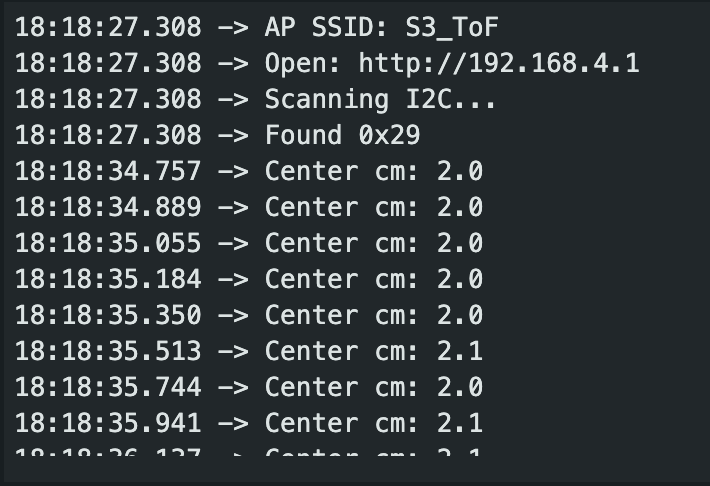
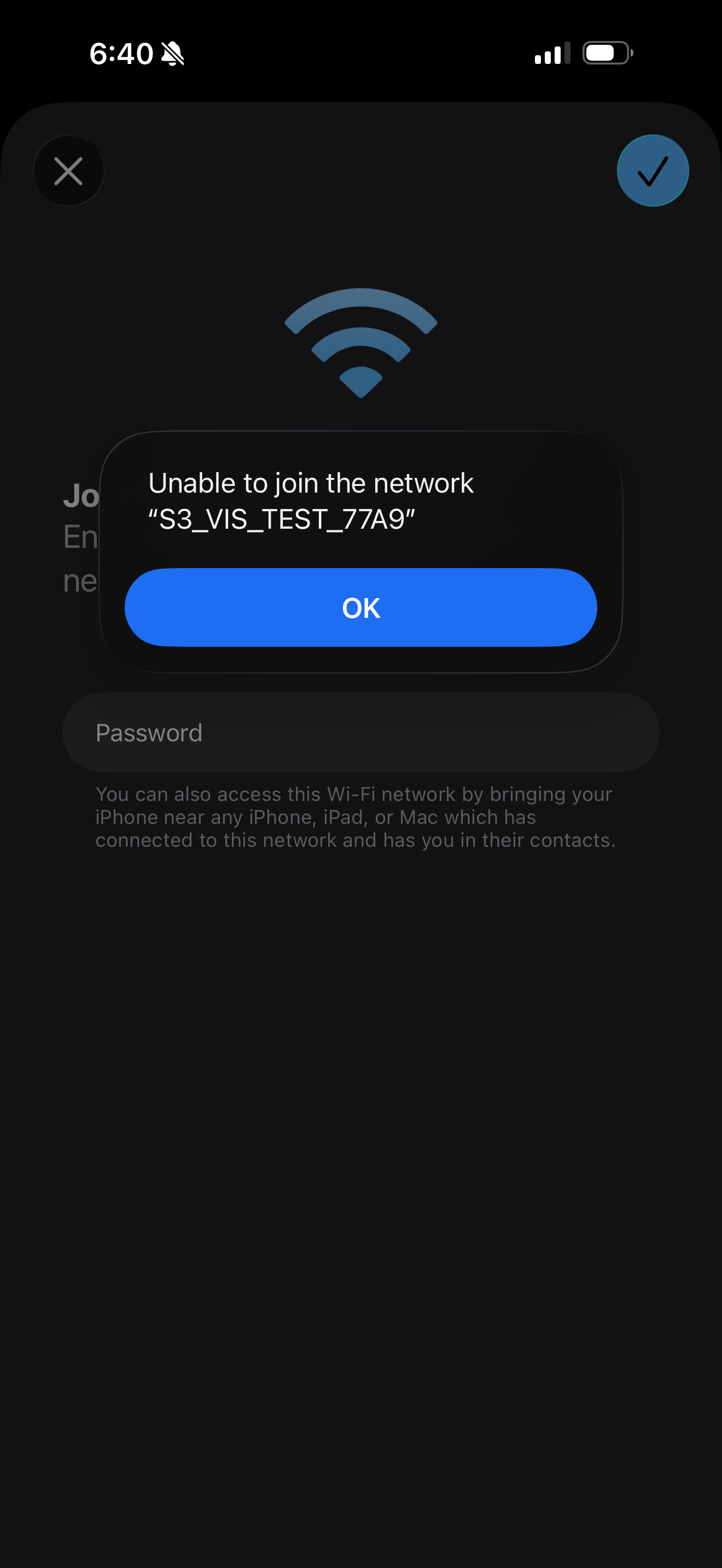
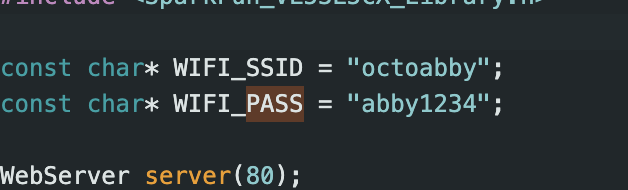
It created the wifi but my phone would just not connect... So I tried to connect to the hotspot instead:
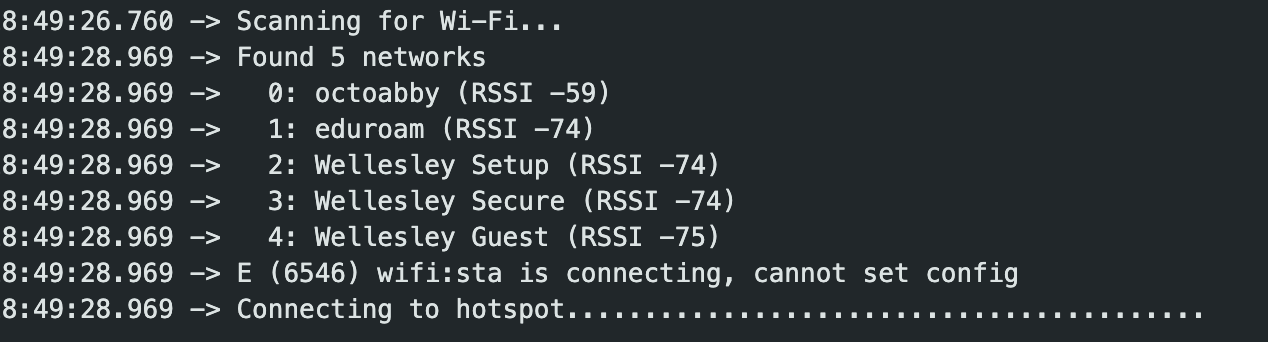
  #include
#include
#include
#include
#include
#include
#include

const char* WIFI_SSID = "octoabby";
const char* WIFI_PASS = "abby1234";

WebServer server(80);

// ===================== OLED =====================
#define SCREEN_WIDTH 128
#define SCREEN_HEIGHT 64
#define OLED_ADDR 0x3C
Adafruit_SSD1306 display(SCREEN_WIDTH, SCREEN_HEIGHT, &Wire, -1);

// ===================== VL53L5CX =====================
SparkFun_VL53L5CX myImager;

// Optional: shutdown pin if wired; else -1
const int LPN_PIN = -1;

// Latest value for web
volatile float latest_cm = NAN;
volatile bool latest_valid = false;
volatile uint32_t latest_ms = 0;

void drawDistance(float cm, bool valid) {
  display.clearDisplay();
  display.setTextColor(SSD1306_WHITE);

  display.setTextSize(1);
  display.setCursor(0, 0);
  display.println(F("VL53L5CX Center (cm)"));

  if (!valid) {
    display.setTextSize(2);
    display.setCursor(0, 18);
    display.println(F("No data"));
    display.display();
    return;
  }

  display.setTextSize(2);
  display.setCursor(0, 18);
  display.print(cm, 1);
  display.println(F(" cm"));

  // Progress bar 0–200 cm
  float v = cm; if (v < 0) v = 0; if (v > 200) v = 200;
  int w = map((int)(v * 10), 0, 2000, 0, SCREEN_WIDTH);
  display.drawRect(0, 44, SCREEN_WIDTH, 14, SSD1306_WHITE);
  display.fillRect(0, 44, w, 14, SSD1306_WHITE);

  display.display();
}

void i2cScanOnce() {
  Serial.println(F("Scanning I2C..."));
  for (uint8_t addr = 1; addr < 127; addr++) {
    Wire.beginTransmission(addr);
    if (Wire.endTransmission() == 0) {
      Serial.print(F("Found 0x")); Serial.println(addr, HEX);
    }
  }


void handleRoot() {
  server.send(200, "text/html", htmlPage());
}

void handleValue() {
  float cm;
  bool valid;
  uint32_t ms;
  noInterrupts();
  cm = latest_cm;
  valid = latest_valid;
  ms = latest_ms;
  interrupts();

  uint32_t age = (ms == 0) ? 0 : (millis() - ms);

  String json = "{";
  json += "\"valid\":";  json += (valid ? "true" : "false"); json += ",";
  json += "\"cm\":";     json += (isnan(cm) ? "0" : String(cm, 3)); json += ",";
  json += "\"age_ms\":"; json += String(age);
  json += "}";

  server.sendHeader("Cache-Control", "no-store");
  server.send(200, "application/json", json);
}

void setup() {
  Serial.begin(115200);
  delay(300);

  // ---- I2C ----
  if (LPN_PIN >= 0) {
    pinMode(LPN_PIN, OUTPUT);
    digitalWrite(LPN_PIN, HIGH);
  }

  Wire.begin();
  Wire.setClock(400000);

  // ---- OLED init ----
  if (!display.begin(SSD1306_SWITCHCAPVCC, OLED_ADDR)) {
    Serial.println(F("SSD1306 init failed"));
    while (1) delay(10);
  }
  display.clearDisplay();
  display.setTextSize(1);
  display.setTextColor(SSD1306_WHITE);
  display.setCursor(0, 0);
  display.println(F("Init..."));
  display.display();

  // ---- Wi-Fi STA (phone hotspot) ----
  WiFi.mode(WIFI_STA);
  WiFi.begin(WIFI_SSID, WIFI_PASS);

  Serial.print("Connecting to hotspot");
  uint32_t t0 = millis();
  while (WiFi.status() != WL_CONNECTED) {
    delay(500);
    Serial.print(".");
    if (millis() - t0 > 20000) { // 20s timeout
      Serial.println("\nWi-Fi connect timeout. Check SSID/PASS.");
      break;
    }
  }

  if (WiFi.status() == WL_CONNECTED) {
    Serial.println("\nConnected!");
    Serial.print("ESP32 IP: ");
    Serial.println(WiFi.localIP());
  }

  // ---- Web server ----
  server.on("/", handleRoot);
  server.on("/value", handleValue);
  server.begin();
  Serial.println("Web server started (port 80).");

  // ---- I2C scan (optional) ----
  i2cScanOnce(); // should see 0x29 (VL53L5CX) and 0x3C (OLED)

  // ---- Sensor init ----
  if (myImager.begin() == false) {
    Serial.println(F("VL53L5CX init FAILED. Check wiring/LPn/I2C."));
    display.clearDisplay();
    display.setCursor(0, 0);
    display.println(F("Sensor init FAIL"));
    display.display();
    while (1) delay(10);
  }

  myImager.setResolution(VL53L5CX_RESOLUTION_8X8);
  myImager.setRangingFrequency(15);
  myImager.startRanging();

  display.clearDisplay();
  display.setCursor(0, 0);
  display.println(F("OK, ranging..."));
  display.display();
  delay(250);
}

void loop() {
  server.handleClient();

  VL53L5CX_ResultsData measurement;

  if (myImager.isDataReady()) {
    if (myImager.getRangingData(&measurement)) {

      // Center 2x2 block (rows 3..4, cols 3..4 in 8x8)
      const int idx33 = 3 * 8 + 3;
      const int idx34 = 3 * 8 + 4;
      const int idx43 = 4 * 8 + 3;
      const int idx44 = 4 * 8 + 4;

      uint16_t vals[4] = {
        measurement.distance_mm[idx33],
        measurement.distance_mm[idx34],
        measurement.distance_mm[idx43],
        measurement.distance_mm[idx44]
      };

      uint32_t sum = 0; int count = 0;
      for (int i = 0; i < 4; i++) {
        if (vals[i] > 0 && vals[i] < 4000) { sum += vals[i]; count++; }
      }

      bool valid = (count > 0);
      float cm = valid ? (sum / (float)count) / 10.0f : NAN;

      noInterrupts();
      latest_valid = valid;
      latest_cm = cm;
      latest_ms = millis();
      interrupts();

      if (valid) {
        Serial.print(F("Center cm: ")); Serial.println(cm, 1);
        drawDistance(cm, true);
      } else {
        Serial.println(F("Center cm: N/A"));
        drawDistance(0.0f, false);
      }
    }
  }

  delay(5);
}