Project Overview
This week I worked on interfaces and applications, creating an application that interfaces a user with an output device I made. The output device from last week is a smell emitter (scent diffuser) that uses ultrasonic vaporization to disperse scents. For this week, I created a unique interface to control that scent output in the form of a rotary telephone. The interface uses the turning wheel of the rotary telephone where instead of numbers on the rotation display, you get different scents that you can dial. For example, dialing 12 activates the smell of home, dialing 6 activates the smell of dinner, and so on. This assignment demonstrates how creative interfaces can transform the way users interact with devices, making scent control intuitive and engaging through a nostalgic and tactile interface.
The Interface: Rotary Telephone Scent Controller
The rotary telephone interface transforms the traditional phone dial into a scent selection mechanism. Instead of dialing phone numbers, users dial scent memories and experiences. The interface works by:
• Rotary Dial Input: The turning wheel of the rotary telephone serves as the input mechanism. As users rotate the dial, the interface detects the position and number dialed
• Scent Mapping: Each number on the dial corresponds to a different scent. The mapping creates an intuitive connection between numbers and scents (e.g., 12 = smell of home, 6 = smell of dinner)
• Tactile Interaction: The physical act of dialing provides a satisfying tactile experience that connects the user to the scent selection process
• Nostalgic Design: The rotary telephone interface evokes nostalgia and familiarity, making the scent control system more approachable and memorable
This interface design transforms scent control from a digital menu selection into a physical, ritualistic act of dialing, creating a more engaging and meaningful interaction with the scent diffuser system.
Interface Design Philosophy
The rotary telephone interface was designed with several key principles in mind:
Tangible Interaction: Unlike digital interfaces that rely on screens and buttons, the rotary telephone provides a physical, mechanical interaction. The act of rotating the dial and feeling the mechanism engage creates a direct connection between the user's action and the system's response.
Memory and Association: By mapping scents to numbers, the interface creates a system of associations. Users can remember their favorite scents by their numbers, creating a personal connection to the system. The numbers become mnemonic devices for scent memories.
Ritual and Intention: The deliberate act of dialing requires more intention than pressing a button. This ritualistic quality makes scent selection a more conscious and meaningful act, transforming it from a passive selection to an active engagement.
Accessibility and Familiarity: The rotary telephone is a familiar object that many people understand intuitively. This familiarity reduces the learning curve and makes the interface immediately accessible, even to users who might be intimidated by digital interfaces.
Nostalgic Connection: The vintage aesthetic of the rotary telephone creates an emotional connection, evoking memories of a different era. This nostalgic quality adds depth to the interaction, making it more than just a functional interface but a meaningful experience.
Technical Implementation
The technical implementation of the rotary telephone interface involves several components:
Rotary Dial Sensing: The rotary dial mechanism needs to be sensed to detect which number is being dialed. This can be accomplished through various methods:
• Optical Sensors: Detecting the position of the dial through optical encoding
• Mechanical Switches: Using switches that are activated as the dial rotates
• Magnetic Sensors: Detecting the position through magnetic encoding
• Computer Vision: Using a camera to detect the dial position
Microcontroller Processing: A microcontroller processes the dial input, maps the number to the corresponding scent, and sends control signals to the scent diffuser system.
Communication Protocol: The interface communicates with the scent diffuser (from Week 12) through the established networking protocol (Bluetooth or wired connection), sending commands to activate specific scents.
Scent Mapping System: The system maintains a mapping between dial numbers and scent profiles. This mapping can be:
• Predefined: Fixed mappings established during design (e.g., 12 = home, 6 = dinner)
• User Customizable: Allowing users to program their own scent-number associations
• Dynamic: Changing based on context, time, or user preferences
Feedback Mechanisms: The interface provides feedback to confirm the selection:
• Visual Feedback: Lights or displays indicating the selected scent
• Auditory Feedback: Sounds or tones confirming the dial action
• Tactile Feedback: Mechanical clicks or vibrations from the dial mechanism
• Olfactory Feedback: The scent itself serves as confirmation that the selection was successful
Scent-Number Mapping
The scent-number mapping creates meaningful associations between dialed numbers and scents. Some example mappings include:
• 12 - Smell of Home: A comforting, familiar scent that evokes the feeling of being at home
• 6 - Smell of Dinner: A warm, appetizing scent associated with meals and dining
• Other Mappings: Additional numbers can be mapped to various scents such as:
- Nature scents (forest, ocean, rain)
- Food scents (coffee, bread, spices)
- Seasonal scents (spring flowers, autumn leaves, winter pine)
- Emotional scents (calm, energizing, nostalgic)
The mapping system allows users to create personal associations, making the interface more meaningful and memorable. Users can develop their own "phone book" of scents, remembering which numbers correspond to their favorite aromas.
Integration with Scent Diffuser System
The rotary telephone interface integrates with the Bluetooth-controlled scent diffuser system developed in Week 12:
Communication Link: The interface communicates with the scent diffuser through the established Bluetooth networking protocol, sending commands to activate specific scents based on the dialed number.
Control Signals: When a number is dialed, the interface sends a control signal to the scent diffuser system, specifying:
• Which scent to activate (based on the number mapping)
• Intensity level (if adjustable)
• Duration (how long to emit the scent)
Multi-Device Coordination: If multiple scent diffusers are networked, the interface can coordinate which device(s) should activate, allowing for distributed scent displays.
Status Feedback: The interface can receive status updates from the scent diffuser system, confirming that the scent has been activated and providing information about the current state of the system.
This integration creates a complete system where the tactile, nostalgic interface of the rotary telephone controls the modern, networked scent diffuser technology, bridging the gap between vintage interaction design and contemporary networked devices.
User Experience Design
The user experience of the rotary telephone interface is designed to be intuitive and engaging:
Discovery Process: Users can explore different scents by dialing different numbers, creating a sense of discovery and experimentation. The interface encourages users to try different combinations and find their preferred scents.
Memory Formation: The physical act of dialing and the association with numbers helps users remember their favorite scents. The tactile memory of dialing a specific number becomes linked with the olfactory memory of the scent.
Ritual and Routine: The deliberate nature of dialing creates a ritual around scent selection. Users might develop routines, such as dialing "12" (home) when they arrive, or "6" (dinner) before meals.
Social Interaction: The interface can become a social experience, with users sharing their favorite "scent numbers" with others, creating a shared language around scent selection.
Accessibility: The familiar rotary telephone interface makes the system accessible to users of all ages and technical backgrounds. The physical interaction doesn't require learning complex digital interfaces or reading small screens.
UI Design: Scent Dial Interface Concepts
Early in the development process, I explored UI design concepts for the rotary phone scent interface (Scent Dial) using AI image generation. The goal was to visualize how the rotary phone dial could be transformed into a scent selection interface, where dialing numbers activates specific scents instead of making phone calls.
AI-Powered Design Exploration
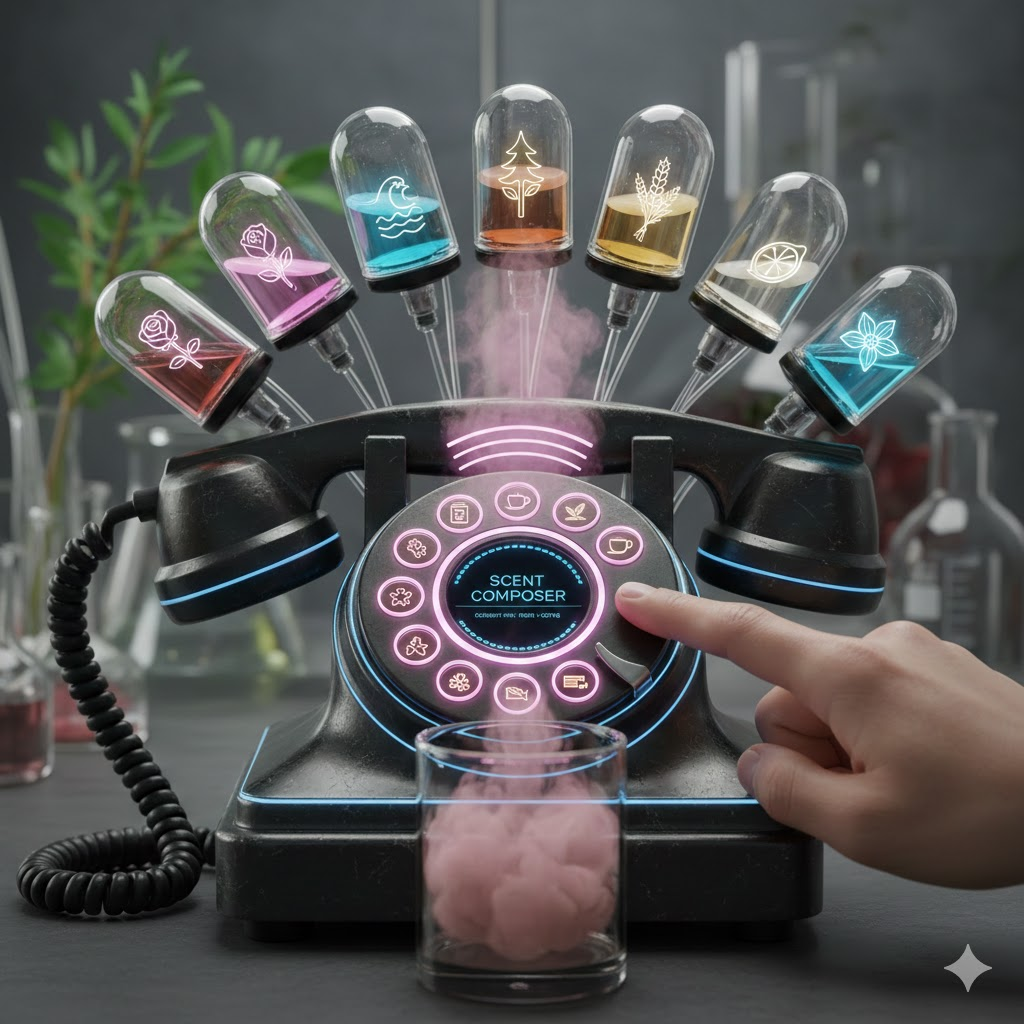
Initial concept UI mockup generated with AI, showing the rotary phone interface with 12 scent emitters mapped to dial positions
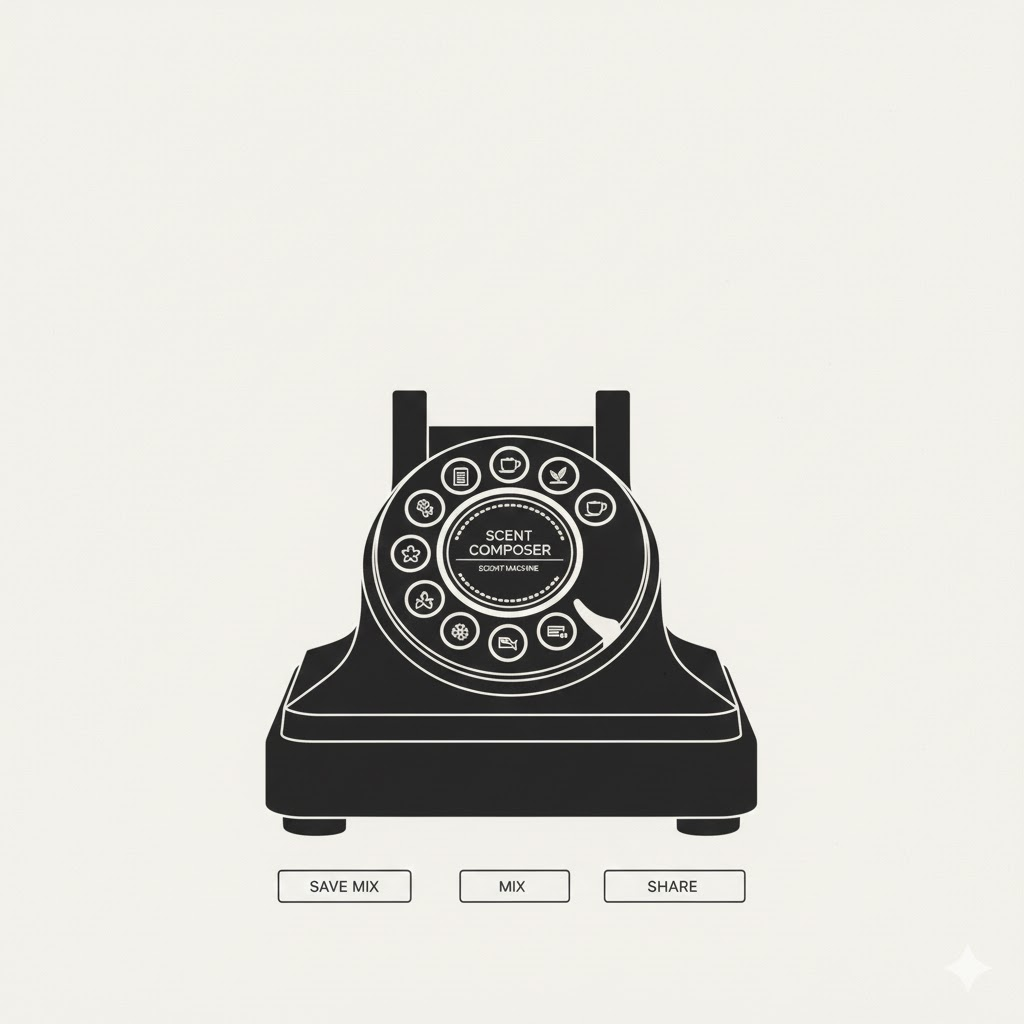
Refined UI mockup with simplified, flat monochrome design focusing on the rotary dial and scent indicators
I used Gemini Nano Banana to generate initial UI mockups based on design prompts. This AI-assisted design process helped visualize the concept before physical implementation.
Initial Concept Prompt:
The AI-generated mockups helped refine the design concept: • Initial Concept: Showed the full phone with detailed scent mapping and mixing capabilities • Refined Design: Simplified to focus on the rotary dial and scent selection, creating a cleaner, more focused interface • Final Implementation: The physical interface uses the actual rotary phone mechanism, with the dial positions naturally mapping to the 12 scent emitters The AI design exploration process demonstrated how the rotary phone's natural 12-position dial (numbers 1-9, 0, *, #) perfectly maps to 12 scent emitters, creating an intuitive one-to-one correspondence between dial position and scent activation.
"design an UI mockup on top of a rotary phone where as you press the numbers instead of dialing the number you activate a specific scent. the rotary phone spins and its supposed to activate different scent emitters (there will be 12) and if you click between them you can have the scent mix together"
This initial prompt generated a concept UI that showed the rotary phone with scent indicators, demonstrating how the 12 scent emitters could be mapped to the dial positions and how mixing scents could work by selecting positions between numbers.
Refined Design Prompt:
"get rid of the phone in the back and keep it simple flat monochrome and old style just have the rotary dial with the scents remove all other visuals"
The refinement prompt simplified the design to focus on the essential elements: the rotary dial and scent indicators. This created a cleaner, more minimalist interface that emphasized the core interaction - dialing to select scents - without visual distractions.
Design EvolutionThe AI-generated mockups helped refine the design concept: • Initial Concept: Showed the full phone with detailed scent mapping and mixing capabilities • Refined Design: Simplified to focus on the rotary dial and scent selection, creating a cleaner, more focused interface • Final Implementation: The physical interface uses the actual rotary phone mechanism, with the dial positions naturally mapping to the 12 scent emitters The AI design exploration process demonstrated how the rotary phone's natural 12-position dial (numbers 1-9, 0, *, #) perfectly maps to 12 scent emitters, creating an intuitive one-to-one correspondence between dial position and scent activation.
UI Design Concepts
Initial concept UI mockup generated with AI, showing the rotary phone interface with 12 scent emitters mapped to dial positions
Refined UI mockup with simplified, flat monochrome design focusing on the rotary dial and scent indicators
Web Interface: Telephone Exchange Control System
In addition to the physical rotary phone interface, I developed a web-based control system inspired by vintage telephone exchange switchboards. This web interface provides an alternative way to control the scent diffuser network, offering a visual representation of the system's connections and status.
Design Concept: Telephone Exchange Aesthetic
The web interface draws visual inspiration from telephone exchange switchboards, where operators would manually connect calls by plugging wires into jacks. This design metaphor creates an intuitive connection between the physical rotary phone interface and the digital control system, maintaining the nostalgic telephone theme throughout the project.
Cursor AI Development Prompt:
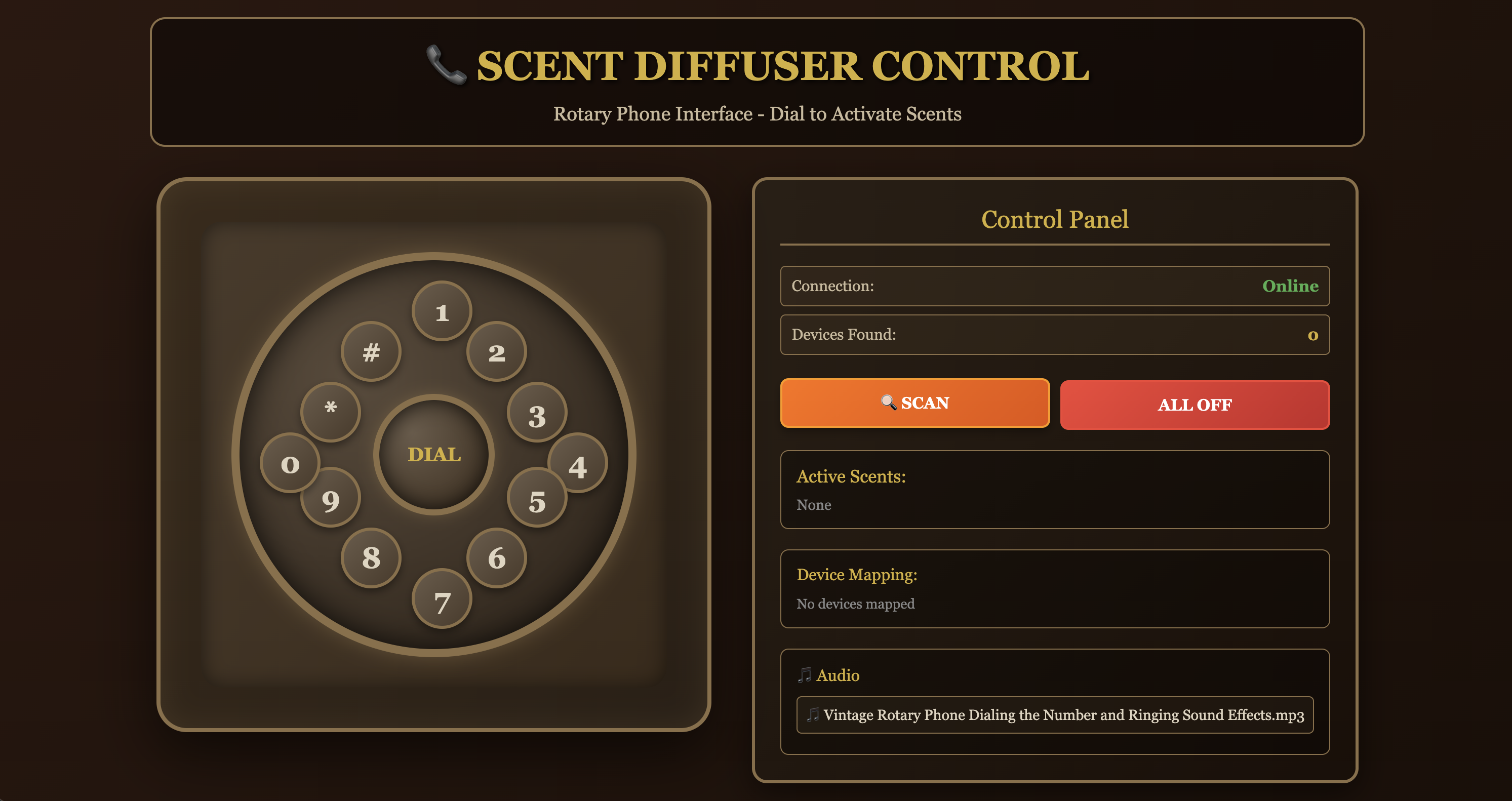
Initial web interface design inspired by telephone exchange switchboards for controlling the scent diffuser network
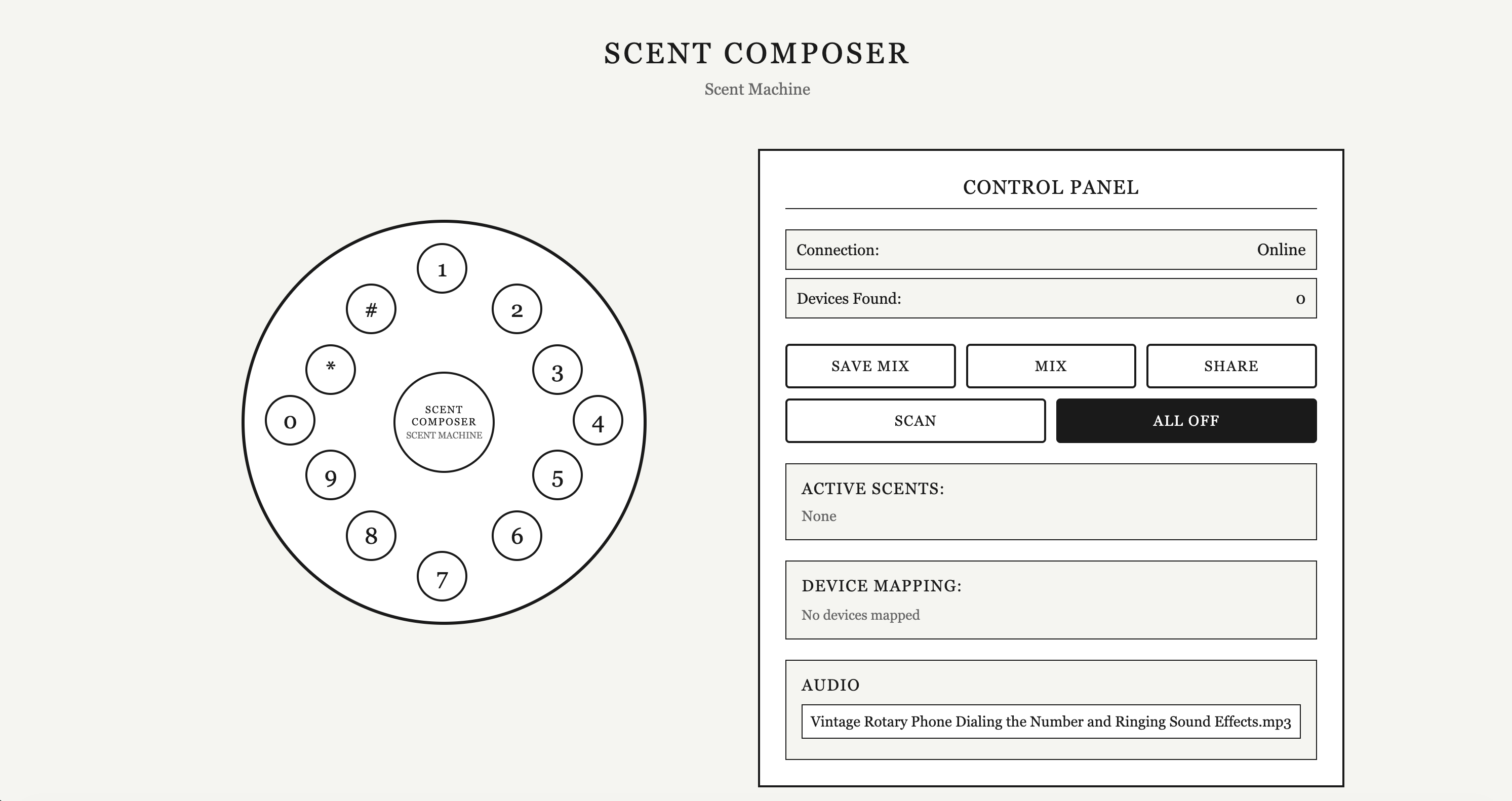
Refined web interface styled after the simplified rotary dial UI with a classical, simplified aesthetic
"I want to create a web interface where I can control the on and off of a scent diffuser. the visual reference is a telephone exchange, the wiring interface allows the user to turn on and off the scents that is online and also control the audio input and output. and add any other further detail such as packages used for visual assets, etc."
This prompt guided the development of a web interface that:
• Visual Design: Mimics the appearance of telephone exchange switchboards with wiring connections and jacks
• Scent Control: Allows users to turn individual scent diffusers on and off through the interface
• Status Monitoring: Shows which scent diffusers are online and available
• Audio Control: Includes controls for audio input and output, extending the interface beyond just scent control
• Connection Visualization: Uses the wiring metaphor to show connections between the control interface and scent diffusers
Refined Web UI Design
The initial web interface was refined using the simplified UI design as a style reference. The refinement process focused on creating a cleaner, more classical interface that maintains the telephone exchange functionality while adopting the minimalist aesthetic of the simplified rotary dial UI.
Refinement Prompt:
"Reference this UI for style and keep it classical and simplified"
This prompt used the simplified rotary dial UI as a style reference, resulting in a refined web interface that:
• Classical Aesthetic: Maintains a timeless, vintage design language consistent with the rotary phone theme
• Simplified Layout: Removes visual clutter while preserving essential functionality
• Monochrome Design: Uses a flat, monochrome color scheme similar to the refined rotary dial UI
• Focused Interaction: Emphasizes the core functionality of controlling scent diffusers without unnecessary visual elements
The refined web UI creates visual harmony between the physical rotary phone interface and the digital control system, ensuring a cohesive design language across all interaction methods.
Web Interface Design
Initial web interface design inspired by telephone exchange switchboards for controlling the scent diffuser network
Refined web interface styled after the simplified rotary dial UI with a classical, simplified aesthetic
Reflection
This week focused on interfaces and applications, creating an application that interfaces a user with the scent diffuser output device from Week 12. The rotary telephone interface demonstrates how creative interface design can transform user interaction with devices, making scent control intuitive, engaging, and meaningful.
Working on the interface design provided valuable experience in understanding how physical interactions can enhance digital systems. The rotary telephone interface bridges the gap between vintage interaction design and modern networked devices, creating a unique user experience that is both nostalgic and functional.
The most significant learning was understanding how interface design can create meaning and connection beyond simple functionality. The mapping of scents to numbers creates a system of associations that users can remember and personalize. The tactile, ritualistic nature of dialing makes scent selection a more conscious and meaningful act than selecting from a digital menu.
The integration with the Bluetooth-controlled scent diffuser system from Week 12 demonstrates how interfaces can connect users to networked devices. The rotary telephone serves as a tangible, accessible interface for controlling the sophisticated scent diffuser technology, making the system more approachable and engaging.
The scent-number mapping system, with examples like "12 = smell of home" and "6 = smell of dinner," creates a personal connection between users and the system. Users can develop their own associations and memories, making the interface more meaningful over time.
The challenges of implementing the rotary dial sensing, mapping numbers to scents, and integrating with the networked diffuser system highlighted the complexity of creating effective interfaces. However, the result is a unique and engaging way to interact with scent technology that is both functional and emotionally resonant.
This week's work emphasized how interface design is fundamental to making technology accessible and meaningful. The rotary telephone interface demonstrates that creative, thoughtful interface design can transform functional devices into engaging experiences that users want to interact with and remember.
Note: This assignment documentation website was created with assistance from Cursor AI.
Note: This assignment documentation website was created with assistance from Cursor AI.
Attachments
Computer Client - Python Bluetooth Control Script (.py)
Web Server - Python Web Interface Server (.py)
Web Server - Python Web Interface Server (.py)
Links