HTMAA 25
home about me final projectThis week’s assignment was to write an application that interfaces with an input and/or output device we have made.
I decided to go with my Bluetooth-controlled plant platform from last week .
My first step was to figure out how to actually connect over bluetooth in the first place. After some Googling, I found and chose to use Python’s Bleak library, built for connecting to BLE devices. I then used a BleakScanner to find my device (named MyESP32 after a tutorial last week), and a BleakClient to connect to it. I then ran the following code to try and understand what was happening:
import asyncio
from bleak import BleakScanner, BleakClient

DEVICE_NAME = "MyESP32"

async def main():
    device = await BleakScanner.find_device_by_name(DEVICE_NAME)
    if device is None:
        print("No device found")
        return

    async with BleakClient(device) as client:
        print(client.name)
        print(client.services)
        print(client.is_connected)

        for service in client.services:
            print("service:", service.uuid)
            for characteristic in service.characteristics:
                print("characteristic:", characteristic.uuid)

if __name__ == "__main__":
    asyncio.run(main())
This produced he following output:
MyESP32
<bleak.backends.service.BleakGATTServiceCollection object at 0x000001F0BF2CAD90>
True
service: 00001800-0000-1000-8000-00805f9b34fb
characteristic: 00002a00-0000-1000-8000-00805f9b34fb
characteristic: 00002a01-0000-1000-8000-00805f9b34fb
service: 00001801-0000-1000-8000-00805f9b34fb
characteristic: 00002a05-0000-1000-8000-00805f9b34fb
characteristic: 00002b3a-0000-1000-8000-00805f9b34fb
characteristic: 00002b29-0000-1000-8000-00805f9b34fb
service: 7e13cc6d-ef5f-4213-a005-64f4dfb2523c
characteristic: b963e6f0-2d8c-4926-9db4-ebb916172f22
Which had some extra services and characteristics from what I was expecting? I wasn’t sure what the first few were, but it was the last service and characteristic that I was interested in.
I then defined a constant CHARACTERISTIC_UUID = "b963e6f0-2d8c-4926-9db4-ebb916172f22" and added the following code to the async context manager to just test writing to the characteristic.
to_write = input("Write: ")
while(to_write != ""):
    await client.write_gatt_char(CHARACTERISTIC_UUID, to_write.encode("utf-8"))
    to_write = input("Write: ")
Which worked!
time_per_led to 200ms because I got impatient That was simpler than expected!
It was super simple to hook up tkinter to make a little window with the buttons I needed.
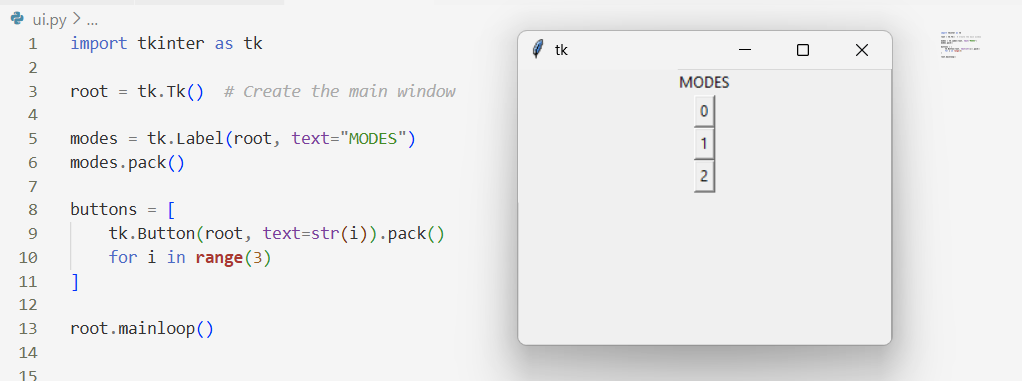
After this, however, I proceeded to get really, really stuck. Tkinter runs in a constant (sync) event loop, while BLE requires async functions and asyncio. I couldn’t figure out how to call async functions with button presses in Tkinter, as Tkinter would not await anything, and would not give up time on the thread for tasks created by e.g. asyncio.create_task to actually execute.
I decided to admit defeat and asked ChatGPT:
Here's my tkinter code with 3 buttons:

root = tk.Tk()  # Create the main window

modes = tk.Label(root, text="MODES")
modes.pack()

buttons = [
    tk.Button(root, text=str(i), command=lambda : call(device, str(i))).pack()
    for i in range(3)
]

root.mainloop()

However, call is an async function which I can't await. How can I get this to work?
To which I got this code skeleton:
import tkinter as tk
import asyncio
import threading

def start_loop(loop):
    asyncio.set_event_loop(loop)
    loop.run_forever()

loop = asyncio.new_event_loop()
threading.Thread(target=start_loop, args=(loop,), daemon=True).start()

def call_async(device, i):
    asyncio.run_coroutine_threadsafe(call(device, i), loop)

root = tk.Tk()

tk.Label(root, text="MODES").pack()

for i in range(3):
    tk.Button(
        root,
        text=str(i),
        command=lambda i=i: call_async(device, str(i))
    ).pack()

root.mainloop()
And some excellent insight as to what was happening and how I needed to keep all asyncio events in the separate thread from tkinter ones to prevent them from blocking each other.
With that, I updated my code:
import tkinter as tk
import asyncio
import threading
from bleak import BleakScanner, BleakClient

DEVICE_NAME = "MyESP32"
CHARACTERISTIC_UUID = "b963e6f0-2d8c-4926-9db4-ebb916172f22"

async def get_device():
    device = await BleakScanner.find_device_by_name(DEVICE_NAME)
    if device is None:
        print("No device found")
        return

    print("device:", device.address)
    return device

async def write(device, to_write):
    print("writing", to_write)
    async with BleakClient(device) as client:
        await client.write_gatt_char(CHARACTERISTIC_UUID, to_write.encode("utf-8"))

def start_loop(loop):
    asyncio.set_event_loop(loop)
    loop.run_forever()

loop = asyncio.new_event_loop()
threading.Thread(target=start_loop, args=(loop,), daemon=True).start()

def call_async(device, i):
    asyncio.run_coroutine_threadsafe(write(device, i), loop)


device = asyncio.run_coroutine_threadsafe(
    get_device(),
    loop
).result()   # wait once, safely

root = tk.Tk()

tk.Label(root, text="MODES").pack()

for i in range(3):
    tk.Button(
        root,
        text=str(i),
        command=lambda i=i: call_async(device, str(i))
    ).pack()

root.mainloop()
And it works!!
Tried to keep it a simple week this week, but ended up learning some interesting things about how the libraries I used (asyncio and tkinter) work. Something to keep in mind for future projects? It’s kind of funny, since if I’d arbitrarily chosen Flask or something with better async compatibility, I would not have learnt about this issue.