Network
Connect WiFi and Controlled with Phone
For the networking module, I specifically chose the Seeed Studio XIAO ESP32S3. Its integrated 2.4GHz WiFi capability is perfect for this project, allowing for seamless wireless communication without the need for bulky external modules. The ESP32S3's dual-core processor handles both the WiFi stack and the motor control logic efficiently. Both the Parent Robot and Baby Robot utilize this chip to connect to the same "MLDEV" WiFi network, creating a unified control system.
The system has two main parts:
🤖 ROBOT 1: The Commander (Parent Robot)
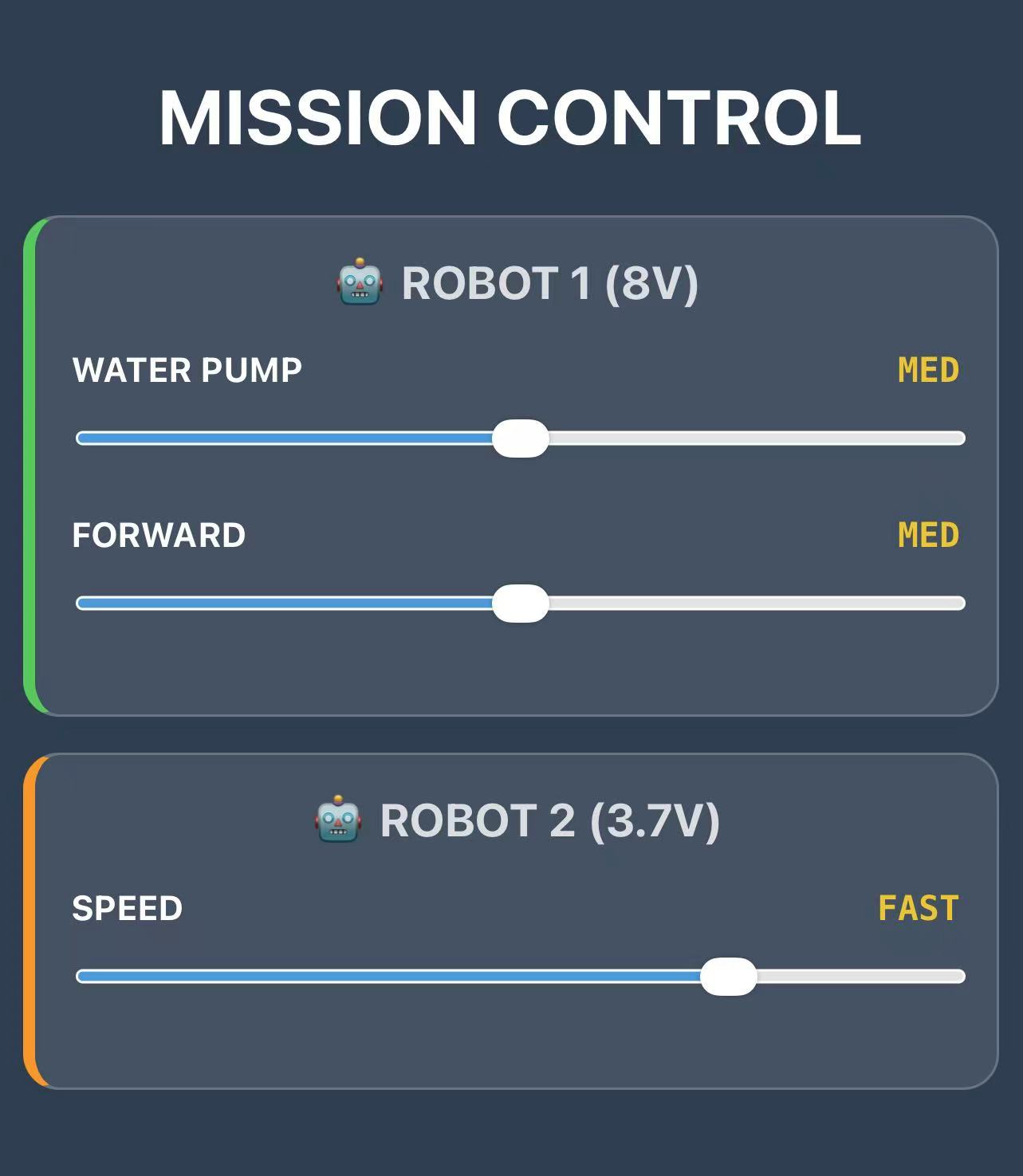
This robot acts as the boss. It creates a simple website that I can open on my phone to control
everything.
How the Code Works:
- Control Panel: The robot hosts a webpage with sliders. When I move a slider on my phone, it instantly sends the new speed to the robot.
- Voltage Protection: My 8V battery is actually too strong for the 6V motors. To keep them safe, the code limits the maximum power to about 75%. Even if I go "Turbo," it holds back a bit to prevent burning out the motors.
- Remote Control: When I want to move Robot 2 (the baby), Robot 1 acts like a messenger. It takes my command and passes it over WiFi to Robot 2.
- Staying Awake: The motor driver tends to fall asleep if it's inactive for too long. The code keeps sending a tiny, invisible signal just to say "stay awake!"
Code: Robot 1 (Commander)
/*
 * ROBOT 1: COMMANDER NODE
 * Battery: 7.4V - 8V (Requires Voltage Limiting)
 * IP Address: 192.168.41.251
 * Function: Controls internal motors and sends commands to Robot 2 via HTTP.
 */

#include <WiFi.h>
#include <WebServer.h>

// --- Pin Definitions ---
const int IN1 = D5;
const int IN2 = D6;
const int IN3 = D7;
const int IN4 = D8;
const int SLEEP_PIN = D9;
const int FAULT = D4;

// --- Wi-Fi Credentials ---
const char* ssid = "MLDEV";
const char* password = "Aysyw2ch?";

// --- Static IP Configuration (.251) ---
IPAddress local_IP(192, 168, 41, 251);
IPAddress gateway(192, 168, 41, 1);
IPAddress subnet(255, 255, 255, 0);
IPAddress primaryDNS(18, 27, 72, 81);

WebServer server(80);

// --- PWM Settings ---
const int freq = 30000;
const int resolution = 8;

// --- Web Interface (Stored in Flash Memory) ---
const char index_html[] PROGMEM = R"rawliteral(
<!DOCTYPE html>
<html lang="en">
<head>
  <meta charset="UTF-8">
  <meta name="viewport" content="width=device-width, initial-scale=1">
  <title>Mission Control</title>
  <style>
    body { font-family: -apple-system, sans-serif; text-align: center; background: #2c3e50; color: white; padding: 10px; margin: 0;}
    h2 { margin-top: 0; font-size: 1.2rem; opacity: 0.8; }

    /* Card Styles */
    .robot-box {
      background: rgba(255,255,255,0.1);
      border-radius: 15px; padding: 15px; margin: 15px auto;
      max-width: 400px; border: 1px solid rgba(255,255,255,0.2);
    }
    .robot-1 { border-left: 5px solid #34c759; } /* Green for Robot 1 */
    .robot-2 { border-left: 5px solid #ff9500; } /* Orange for Robot 2 */

    .control-group { margin-bottom: 15px; }
    .label { display: flex; justify-content: space-between; font-weight: bold; font-size: 0.9rem; margin-bottom: 5px;}
    input[type=range] { width: 100%; height: 25px; accent-color: #3498db; }

    .status { font-family: monospace; font-weight: bold; color: #f1c40f; }
  </style>
</head>
<body>

  <h1>MISSION CONTROL</h1>

  <div class="robot-box robot-1">
    <h2>🤖 ROBOT 1 (8V)</h2>
    <div class="control-group">
      <div class="label"><span>WATER PUMP</span> <span id="r1_pump_txt" class="status">STOP</span></div>
      <input type="range" min="0" max="4" value="0" oninput="cmd(1, 'pump', this.value)">
    </div>
    <div class="control-group">
      <div class="label"><span>FORWARD</span> <span id="r1_move_txt" class="status">STOP</span></div>
      <input type="range" min="0" max="4" value="0" oninput="cmd(1, 'move', this.value)">
    </div>
  </div>

  <div class="robot-box robot-2">
    <h2>🤖 ROBOT 2 (3.7V)</h2>
    <div class="control-group">
      <div class="label"><span>SPEED</span> <span id="r2_speed_txt" class="status">STOP</span></div>
      <input type="range" min="0" max="4" value="0" oninput="cmd(2, 'speed', this.value)">
    </div>
  </div>

  <script>
    const gears = ["STOP", "SLOW", "MED", "FAST", "TURBO"];
    const ip2 = "http://192.168.41.252"; // Robot 2 IP

    function cmd(robot, type, val) {
      val = parseInt(val);

      // Update UI Text
      let id = "";
      if(robot === 1 && type === 'pump') id = "r1_pump_txt";
      if(robot === 1 && type === 'move') id = "r1_move_txt";
      if(robot === 2) id = "r2_speed_txt";
      document.getElementById(id).innerText = gears[val];

      // Send Command
      let url = "";
      if (robot === 1) {
        // Control Self
        url = "/set?motor=" + type + "&val=" + val;
      } else {
        // Control Robot 2 (Cross-Origin Request)
        url = ip2 + "/set?val=" + val;
      }

      // Send non-blocking request
      fetch(url).catch(err => console.log("Error:", err));
    }
  </script>
</body>
</html>
)rawliteral";

void handleRoot() { server.send(200, "text/html", index_html); }

void handleSet() {
  // Add CORS header just in case
  server.sendHeader("Access-Control-Allow-Origin", "*");

  if (server.hasArg("motor") && server.hasArg("val")) {
    String motor = server.arg("motor");
    int val = server.arg("val").toInt();
    int pwmValue = 0;

    // --- LOGIC: 8V Protection & Anti-Sleep ---
    switch(val) {
      case 0: pwmValue = 1; break;   // CRITICAL: Send 1 instead of 0 to keep driver awake
      case 1: pwmValue = 110; break;
      case 2: pwmValue = 140; break;
      case 3: pwmValue = 170; break;
      case 4: pwmValue = 195; break; // SAFETY: Limit to 195 (approx 6V) to prevent Brownout
      default: pwmValue = 1;
    }

    if (motor == "pump") {
      ledcWrite(IN1, pwmValue);
    } else if (motor == "move") {
      ledcWrite(IN3, pwmValue);
    }
    server.send(200, "text/plain", "OK");
  } else { server.send(400, "text/plain", "Bad Request"); }
}

void setup() {
  Serial.begin(115200);
  pinMode(IN1, OUTPUT); pinMode(IN2, OUTPUT);
  pinMode(IN3, OUTPUT); pinMode(IN4, OUTPUT);
  pinMode(SLEEP_PIN, OUTPUT); pinMode(FAULT, INPUT_PULLUP);
  pinMode(LED_BUILTIN, OUTPUT);

  // Initialize Pins
  digitalWrite(IN2, LOW);
  digitalWrite(IN4, LOW);
  digitalWrite(SLEEP_PIN, HIGH); // Wake up driver

  // Initialize PWM (Start at 1 to prevent sleep)
  ledcAttach(IN1, freq, resolution);
  ledcAttach(IN3, freq, resolution);
  ledcWrite(IN1, 1);
  ledcWrite(IN3, 1);

  // Network Setup
  WiFi.config(local_IP, gateway, subnet, primaryDNS);
  WiFi.begin(ssid, password);

  // LED Logic: Blink while connecting
  while (WiFi.status() != WL_CONNECTED) {
    digitalWrite(LED_BUILTIN, !digitalRead(LED_BUILTIN));
    delay(200);
  }

  // LED Logic: Solid ON when connected (Low = On for XIAO)
  digitalWrite(LED_BUILTIN, LOW);

  server.on("/", handleRoot);
  server.on("/set", handleSet);
  server.begin();
}

void loop() {
  server.handleClient();

  // Watchdog: Force SLEEP_PIN HIGH constantly
  digitalWrite(SLEEP_PIN, HIGH);
  delay(2);
}
🤖 ROBOT 2: The Receiver (Baby Robot)
This robot basically listens to whatever Robot 1 says.
How the Code Works:
- Permission to Talk (CORS): Web browsers are strict; they usually block websites from sending commands to different devices. The "CORS" code is just a way of telling the browser, "It's okay, let Robot 1 talk to me."
- Full Power: Since this robot runs on a smaller battery, it needs all the juice it can get. Unlike Robot 1, I let the motors run at 100% power here to make sure they have enough strength to push the water.
- Simple Instructions: It doesn't "think" much. It just waits for a speed number (like 1, 2, 3...) and immediately sets the motor to that speed.
Code: Robot 2 (Receiver)
/*
 * ROBOT 2: RECEIVER NODE
 * Battery: 3.7V (Max Power Allowed)
 * IP Address: 192.168.41.252
 * Function: Receives commands via HTTP, allows Cross-Origin requests.
 */

#include <WiFi.h>
#include <WebServer.h>

// --- Pin Definitions ---
const int IN1 = D5; const int IN2 = D6;
const int IN3 = D7; const int IN4 = D8;
const int SLEEP_PIN = D9;
const int FAULT = D4;

// --- Wi-Fi Credentials ---
const char* ssid = "MLDEV";
const char* password = "Aysyw2ch?";

// --- Static IP Configuration (.252) ---
IPAddress local_IP(192, 168, 41, 252);
IPAddress gateway(192, 168, 41, 1);
IPAddress subnet(255, 255, 255, 0);
IPAddress primaryDNS(18, 27, 72, 81);

WebServer server(80);

const int freq = 30000;
const int resolution = 8;

void handleSet() {
  // --- CRITICAL: CORS Header ---
  // Allows Robot 1 (at .251) to control this robot
  server.sendHeader("Access-Control-Allow-Origin", "*");

  if (server.hasArg("val")) {
    int val = server.arg("val").toInt();
    int pwm = 0;

    // --- LOGIC: 3.7V Power Mapping ---
    // Since voltage is low, we need higher PWM values to move
    switch(val) {
      case 0: pwm = 1;   break; // Anti-Sleep (Keep signal alive)
      case 1: pwm = 150; break; // SLOW (Needs high PWM to start)
      case 2: pwm = 185; break; // MED
      case 3: pwm = 220; break; // FAST
      case 4: pwm = 255; break; // MAX (Full 3.7V power)
      default: pwm = 1;
    }

    // drive both ports synchronously
    ledcWrite(IN1, pwm);
    ledcWrite(IN3, pwm);

    server.send(200, "text/plain", "OK");
  } else {
    server.send(400, "text/plain", "Bad Request");
  }
}

void setup() {
  Serial.begin(115200);
  pinMode(IN1, OUTPUT); pinMode(IN2, OUTPUT);
  pinMode(IN3, OUTPUT); pinMode(IN4, OUTPUT);
  pinMode(SLEEP_PIN, OUTPUT); pinMode(FAULT, INPUT_PULLUP);
  pinMode(LED_BUILTIN, OUTPUT); // Yellow LED

  // Initialize Pins
  digitalWrite(IN2, LOW);
  digitalWrite(IN4, LOW);
  digitalWrite(SLEEP_PIN, HIGH); // Wake up driver

  // Initialize PWM
  ledcAttach(IN1, freq, resolution);
  ledcAttach(IN3, freq, resolution);
  ledcWrite(IN1, 1);
  ledcWrite(IN3, 1);

  // Network Setup
  WiFi.config(local_IP, gateway, subnet, primaryDNS);
  WiFi.begin(ssid, password);

  // LED Logic: Blink while connecting
  while (WiFi.status() != WL_CONNECTED) {
    digitalWrite(LED_BUILTIN, !digitalRead(LED_BUILTIN));
    delay(200);
  }

  // LED Logic: Solid ON when connected
  digitalWrite(LED_BUILTIN, LOW);

  // Start Server (No HTML needed here, just API)
  server.on("/set", handleSet);
  server.begin();
}

void loop() {
  server.handleClient();

  // Watchdog: Force SLEEP_PIN HIGH
  digitalWrite(SLEEP_PIN, HIGH);
  delay(2);
}
This is the actual video showing the system in action. You can see how I open the control website on my phone and swipe the sliders. The robots respond immediately! Whether it's the parent robot moving itself or sending a command to the baby robot, the connection is stable and the reaction is seamless.
Group Collaboration: Connecting Projects
I connected my project with Eitan's project. It worked very smoothly.
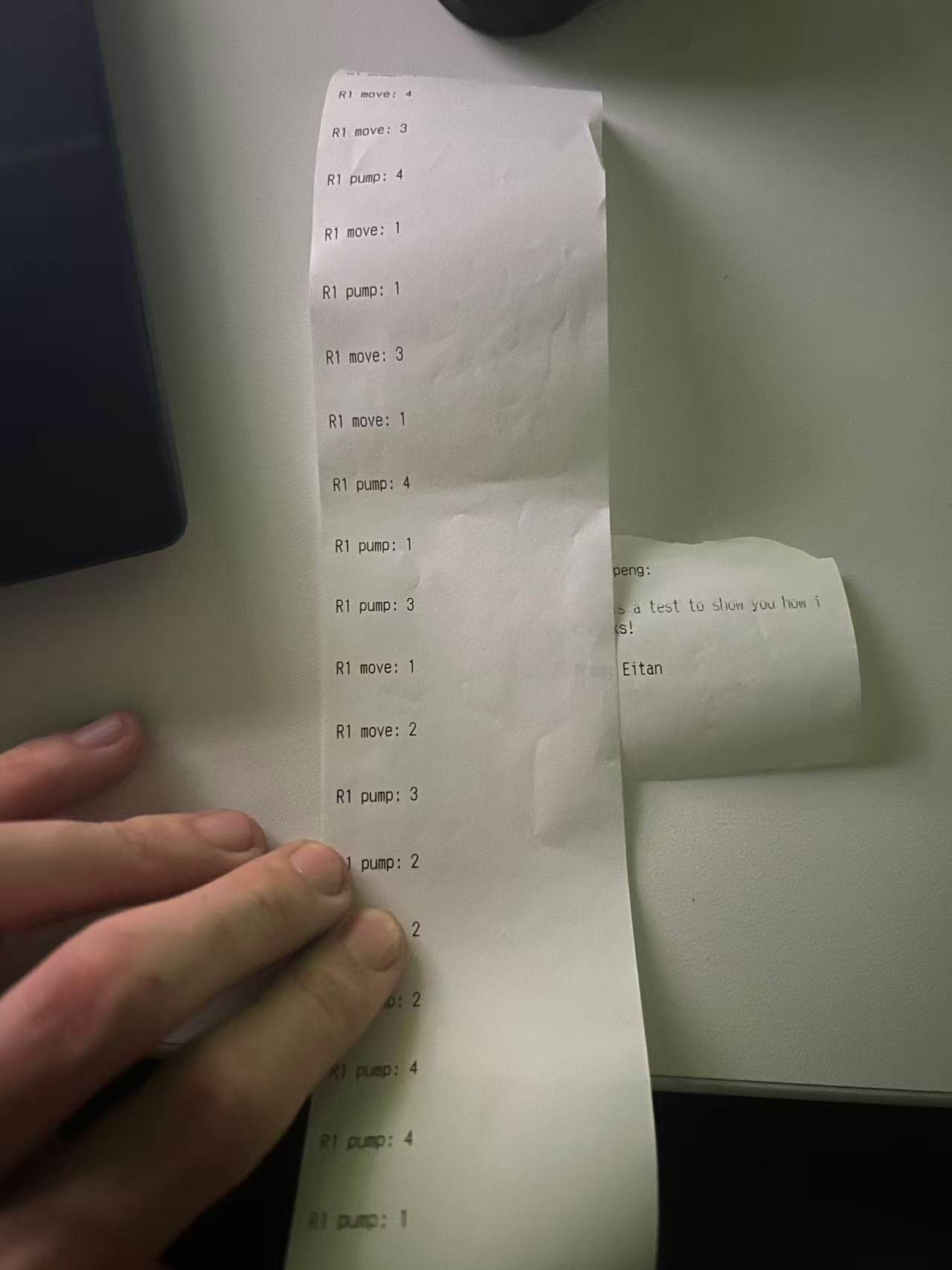
My robot (Robot 1) acts as a bridge. When I control the robot, it sends the command to the motors and simultaneously publishes the status to Adafruit IO. Eitan's project, which is an Adafruit IO Printer, subscribes to this feed. When my robot moves, his printer receives the signal and prints out the status.
Code: Robot 1 (Mission Control + Adafruit IO Bridge)
/*
 * ROBOT 1: MISSION CONTROL + ADAFRUIT IO BRIDGE
 */

#include <WiFi.h>
#include <WebServer.h>
#include <PubSubClient.h> // Required for Adafruit IO

// --- Pins ---
const int IN1 = D5; const int IN2 = D6;
const int IN3 = D7; const int IN4 = D8;
const int SLEEP_PIN = D9;
const int FAULT = D4;

// --- WiFi & MQTT Config ---
const char* ssid = "MLDEV";
const char* password = "Aysyw2ch?";

// Adafruit IO Details
const char* mqtt_server = "io.adafruit.com";
const int mqtt_port = 1883;
const char* aio_user = "ewolf";
const char* aio_feed = "ewolf/feeds/oled-text"; // Sending to Robot 2's feed

// Robot 1 IP
IPAddress local_IP(192, 168, 41, 251);
IPAddress gateway(192, 168, 41, 1);
IPAddress subnet(255, 255, 255, 0);
IPAddress primaryDNS(18, 27, 72, 81);

WiFiClient espClient;
PubSubClient mqtt(espClient);
WebServer server(80);

const int freq = 30000;
const int resolution = 8;

float LEFT_TRIM  = 1.0;
float RIGHT_TRIM = 1.0;

void reconnectMQTT() {
  while (!mqtt.connected()) {
    Serial.print("Attempting MQTT connection...");
    String clientId = "Robot1_Master_" + String(random(0xffff), HEX);
    if (mqtt.connect(clientId.c_str(), aio_user, aio_key)) { // Note: aio_key needs to be defined
      Serial.println("connected");
    } else {
      Serial.print("failed, rc=");
      Serial.print(mqtt.state());
      delay(2000);
    }
  }
}

const char index_html[] PROGMEM = R"rawliteral(
<!DOCTYPE html>
<html>
<head>
  <meta charset="UTF-8">
  <meta name="viewport" content="width=device-width, initial-scale=1">
  <title>Mission Control</title>
  <style>
    body { font-family: -apple-system, sans-serif; text-align: center; background: #2c3e50; color: white; padding: 10px; margin: 0;}
    .robot-box { background: rgba(255,255,255,0.1); border-radius: 15px; padding: 20px; margin: 15px auto; max-width: 400px; border: 1px solid rgba(255,255,255,0.1); text-align: left;}
    .robot-1 { border-left: 6px solid #34c759; }
    .robot-2 { border-left: 6px solid #ff9500; }
    .label-row { display: flex; justify-content: space-between; font-weight: bold; font-size: 0.85rem; margin-bottom: 8px; color: #bdc3c7;}
    .status { color: #f1c40f; font-weight: 800; }
    input[type=range] { width: 100%; height: 8px; border-radius: 4px; background: #bdc3c7; outline: none; -webkit-appearance: none; }
    input[type=range]::-webkit-slider-thumb { -webkit-appearance: none; width: 28px; height: 28px; border-radius: 50%; background: white; }
  </style>
</head>
<body>
  <h1>MISSION CONTROL</h1>
  <div class="robot-box robot-1">
    <h2>🤖 ROBOT 1 (8V)</h2>
    <div class="control-group">
      <div class="label-row"><span>WATER PUMP</span> <span id="r1_pump_txt" class="status">STOP</span></div>
      <input type="range" min="0" max="4" value="0" oninput="cmd(1, 'pump', this.value)">
    </div>
    <div class="control-group">
      <div class="label-row"><span>FORWARD</span> <span id="r1_move_txt" class="status">STOP</span></div>
      <input type="range" min="0" max="4" value="0" oninput="cmd(1, 'move', this.value)">
    </div>
  </div>
  <div class="robot-box robot-2">
    <h2>🤖 ROBOT 2 (3.7V)</h2>
    <div class="control-group">
      <div class="label-row"><span>SPEED / PRINT</span> <span id="r2_speed_txt" class="status">STOP</span></div>
      <input type="range" min="0" max="4" value="0" oninput="cmd(2, 'speed', this.value)">
    </div>
  </div>
  <script>
    const gears = ["STOP", "SLOW", "MED", "FAST", "TURBO"];
    function cmd(robot, type, val) {
      let id = (robot === 1) ? ("r1_" + type + "_txt") : "r2_speed_txt";
      document.getElementById(id).innerText = gears[val];
      // All commands go to Robot 1's /set endpoint
      fetch("/set?robot=" + robot + "&motor=" + type + "&val=" + val).catch(e => console.log(e));
    }
  </script>
</body>
</html>
)rawliteral";

void handleRoot() { server.send(200, "text/html", index_html); }

void handleSet() {
  server.sendHeader("Access-Control-Allow-Origin", "*");
  if (server.hasArg("val")) {
    int robot = server.arg("robot").toInt();
    String motor = server.arg("motor");
    int val = server.arg("val").toInt();

    // --- LOCAL ROBOT 1 LOGIC ---
    if (robot == 1) {
      int pwm = 0;
      switch(val) {
        case 0: pwm = 1;   break;
        case 1: pwm = 140; break;
        case 2: pwm = 180; break;
        case 3: pwm = 220; break;
        case 4: pwm = 255; break;
        default: pwm = 1;
      }

      if (motor == "pump") ledcWrite(IN1, pwm);
      else if (motor == "move") {
        ledcWrite(IN1, pwm * LEFT_TRIM);
        ledcWrite(IN3, pwm * RIGHT_TRIM);
      }
    }

    // --- MQTT BRIDGE LOGIC ---
    // Send status to Robot 2 via Adafruit IO
    if (mqtt.connected()) {
      String statusMsg = "R" + String(robot) + " " + motor + ": " + String(val);
      mqtt.publish(aio_feed, statusMsg.c_str());
    }

    server.send(200, "text/plain", "OK");
  } else {
    server.send(400, "text/plain", "Bad Request");
  }
}

void setup() {
  Serial.begin(115200);
  pinMode(IN1, OUTPUT); pinMode(IN2, OUTPUT);
  pinMode(IN3, OUTPUT); pinMode(IN4, OUTPUT);
  pinMode(SLEEP_PIN, OUTPUT); digitalWrite(SLEEP_PIN, HIGH);

  ledcAttach(IN1, freq, resolution);
  ledcAttach(IN3, freq, resolution);

  WiFi.config(local_IP, gateway, subnet, primaryDNS);
  WiFi.begin(ssid, password);
  while (WiFi.status() != WL_CONNECTED) { delay(500); Serial.print("."); }

  mqtt.setServer(mqtt_server, mqtt_port);

  server.on("/", handleRoot);
  server.on("/set", handleSet);
  server.begin();
}

void loop() {
  if (!mqtt.connected()) reconnectMQTT();
  mqtt.loop();
  server.handleClient();
}