Interface and Application Programming
01 · Overview
For Assignment 13, I developed the SmartPi Admin Web App, a comprehensive browser-based interface for configuring, monitoring, and managing the SmartPi Assistant device. The application provides an intuitive Material Design 3 interface that allows users to configure all device settings, manage message inputs, control audio output, configure network connections, and perform system testing — all from a laptop or mobile device.
The SmartPi Admin Web App serves as the central control panel for the SmartPi ecosystem, bridging the gap between the cloud-based N8N workflow, the local MCP bridge server, and the embedded SmartPi device running CircuitPython firmware.
02 · Application Architecture
System Integration
The SmartPi Admin Web App integrates with the broader SmartPi ecosystem:
- SmartPi Device (Pico W): Direct HTTP communication on local network for configuration and status
- MCP Bridge Server: Configuration for bridge server IP and port settings
- N8N Workflow: Message input configuration (Email, Calendar, Weather, Slack)
- Local Storage: Browser localStorage for UI preferences and device discovery
- File System: JSON-based configuration profiles and message logs (planned)
System integration details with N8N, MCP bridge, and message flow will be documented after completing the integration implementation. The current focus is on the Admin App interface design and functionality.
Technology Stack
The application is built using modern web technologies optimized for performance, maintainability, and user experience:
| Component | Technology | Purpose |
|---|---|---|
| Framework | React 18 + TypeScript | Component-based UI with type safety |
| UI Library | Material-UI v6 (MUI) | Material Design 3 components and theming |
| Build Tool | Vite | Fast development and optimized production builds |
| State Management | Zustand | Lightweight state management for device config |
| HTTP Client | Axios | API communication with retry logic |
| File System | File System Access API | Local JSON file read/write for configs |
03 · Design Principles
Material Design 3
The application follows Material Design 3 (Material You) principles, Google's latest design system. Key design elements include:
- Dynamic Color System: Custom theme with SmartPi brand color (International Orange #FF3300) as primary
- Dark Mode Default: Optimized for OLED displays and low-light environments
- Elevation & Shadows: Material elevation levels for visual hierarchy
- Motion Design: Smooth transitions (200-300ms) for state changes
- Typography Scale: Material Design 3 type scale for consistent text hierarchy
- Rounded Corners: 12px border radius for modern, friendly appearance
Responsive Design
The interface adapts seamlessly across device sizes using Material Design breakpoints:
- Mobile (xs, sm): Bottom navigation, single-column layout, simplified controls
- Tablet (md): Mini drawer sidebar, two-column grids, horizontal tabs
- Desktop (lg, xl): Permanent sidebar, multi-column layouts, full feature set
Accessibility
Built-in accessibility features from Material-UI ensure WCAG 2.1 Level AA compliance:
- Keyboard navigation support
- Screen reader compatibility (ARIA labels)
- High contrast mode support
- Minimum 48px touch targets (exceeds 44px standard)
- Focus indicators with Material ripple effects
04 · Application Interface
Dashboard
The new Dashboard provides a high-level overview of the entire SmartPi system. It shows the selected device status, uptime, WiFi strength, message counts, background service status (NGROK, MCP Bridge, Vite), recent system test results, and a summary of recent messages, all in one place.
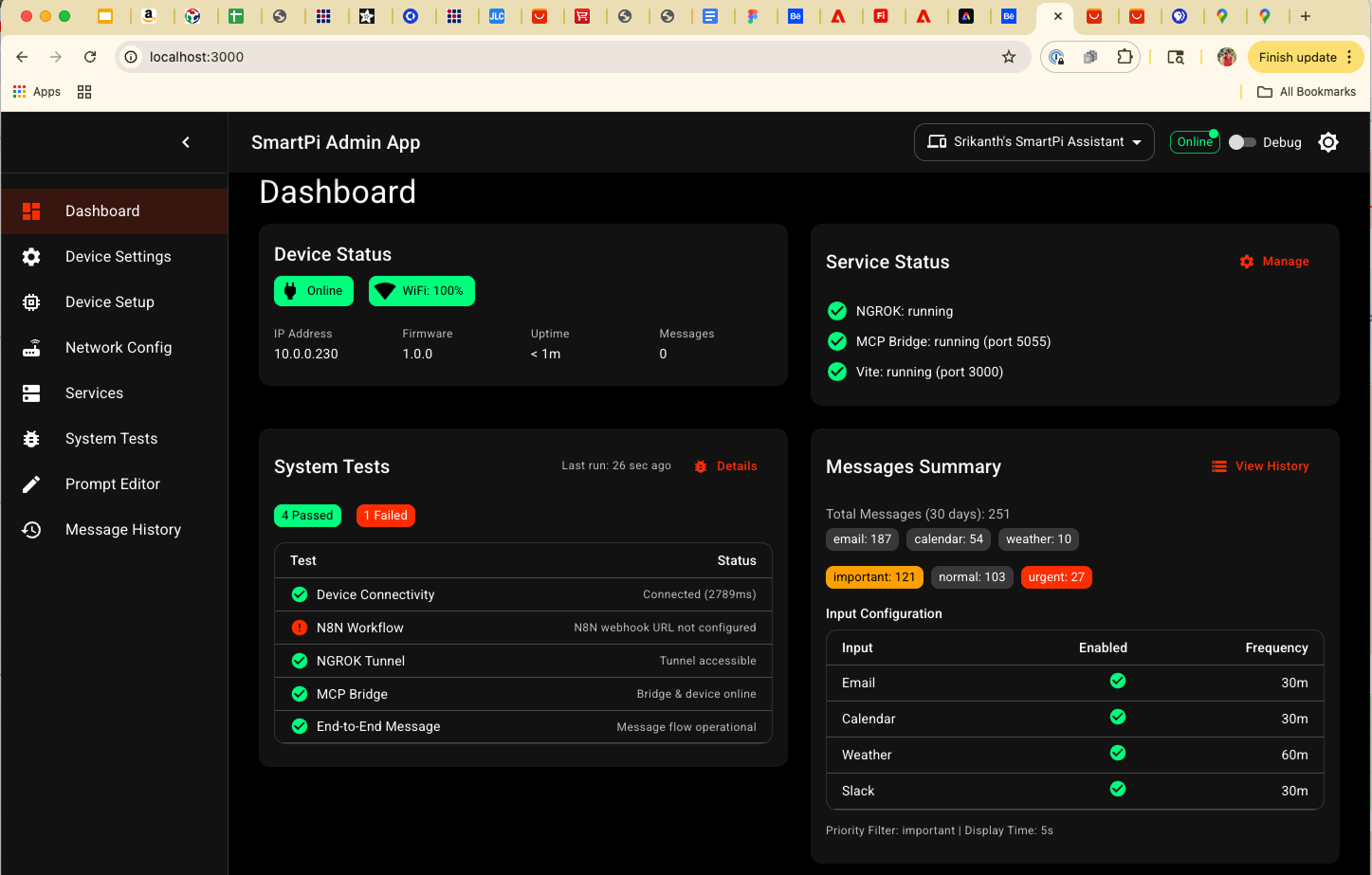
Dashboard: Central hub summarizing device health, background services, system tests, and recent message activity.
Device Settings
The Device Settings page focuses on configuring the LED matrix display and core device behavior. It exposes all firmware parameters that control the 64×64 RGB matrix, text layout, and message display timing in a single responsive view.
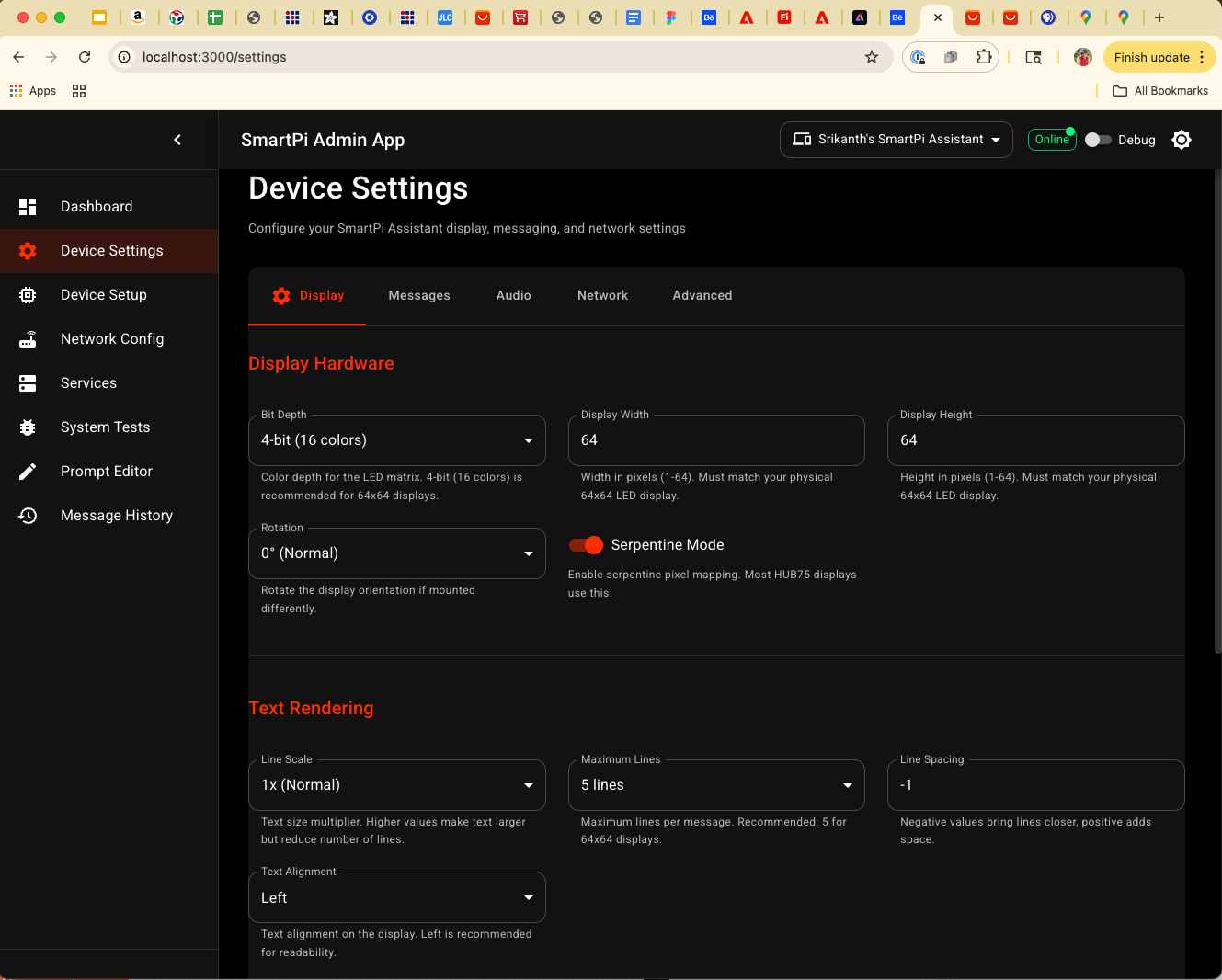
Device Settings: Detailed configuration for the 64×64 LED matrix (bit depth, width/height, rotation, line scale, max lines, margins, and theme stripe) together with message display priority and timing.
Device Setup
The Device Setup page manages SmartPi devices themselves. It provides the SMARTPI_ROOT selector,
firmware upload controls for main.py and CircuitPython UF2 images, and an "Add Device"
workflow for registering new SmartPi devices by name, IP, and port.
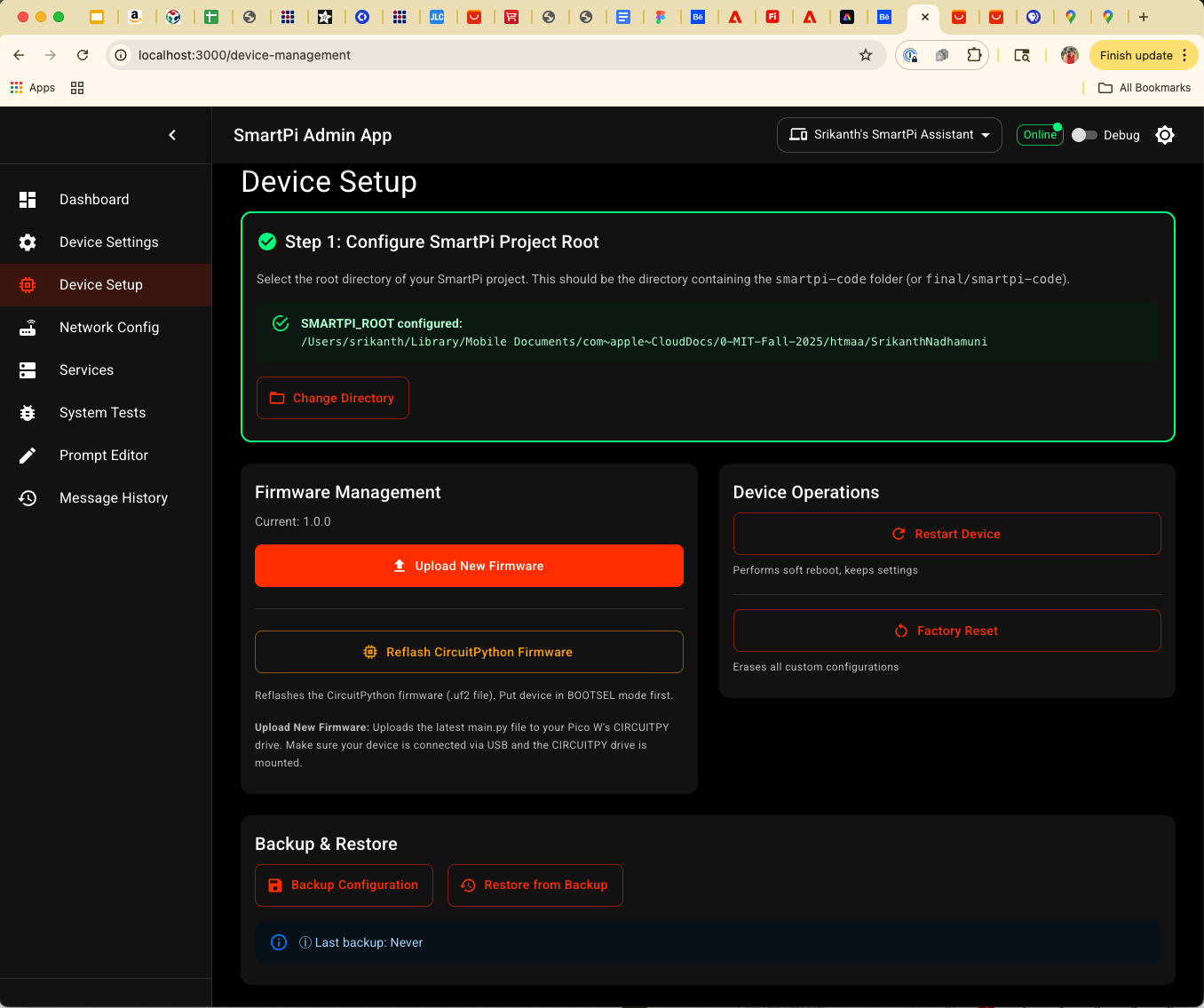
Device Setup: SMARTPI_ROOT configuration, firmware upload workflows, and the Add Device dialog for registering new SmartPi devices.
Network Config
The Network Config page centralizes all network-related settings: WiFi credentials, SmartPi device IP and port, MCP bridge host/port, NGROK tunnel URL, and N8N webhook URL. It can generate ready-to-use configuration snippets for Python, shell scripts, YAML, and the Vite proxy.
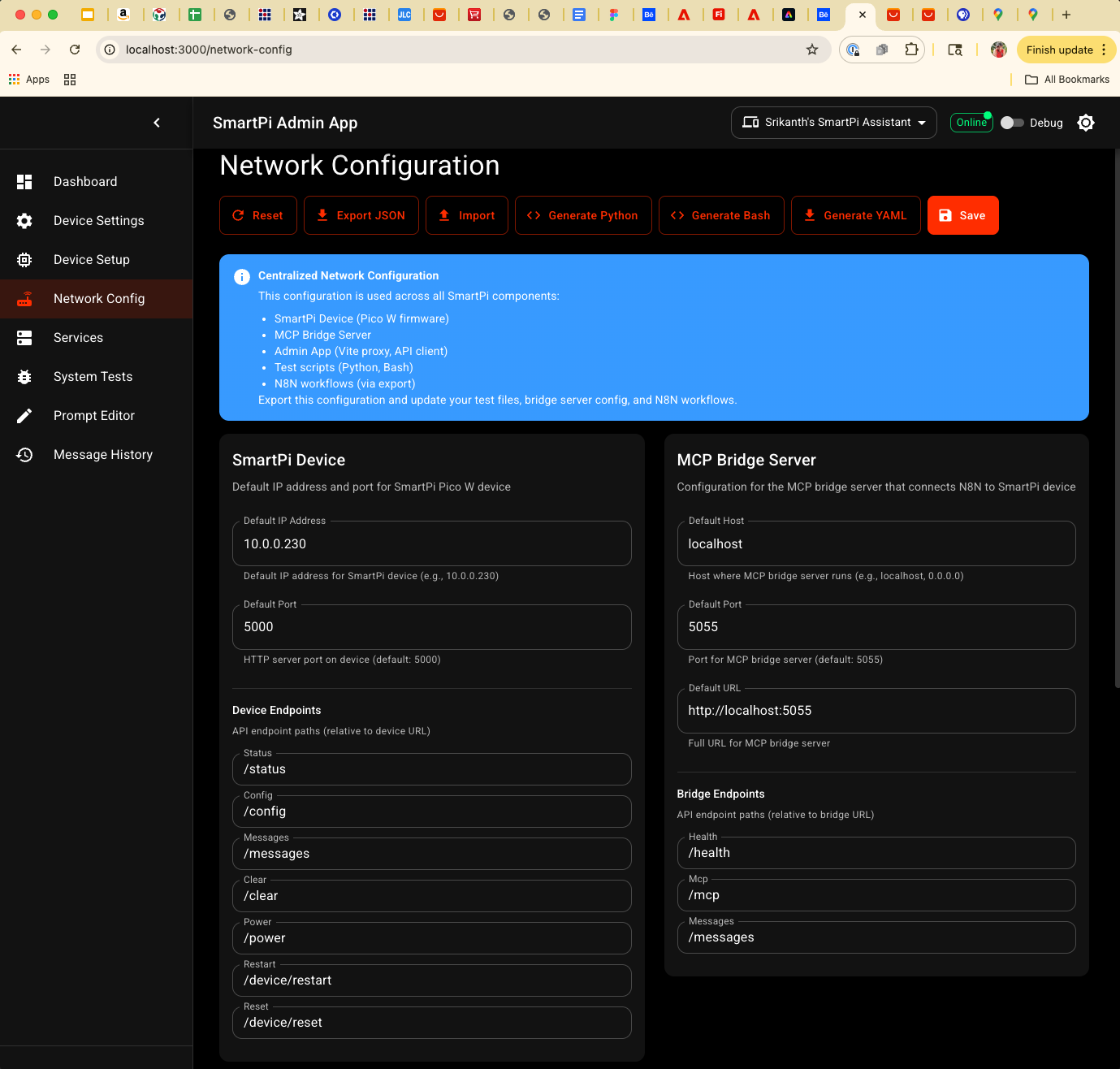
Network Config: Single place to manage WiFi, device, MCP bridge, NGROK, and N8N settings, plus exportable config snippets for the rest of the SmartPi stack.
Service Management
The Services page talks to a Node.js service-manager backend and allows starting, stopping, and monitoring NGROK, the MCP bridge server, and the Vite dev server. It shows live status (running, stopped, error), ports, and tunnel URLs, and offers "Start All" / "Stop All" controls.
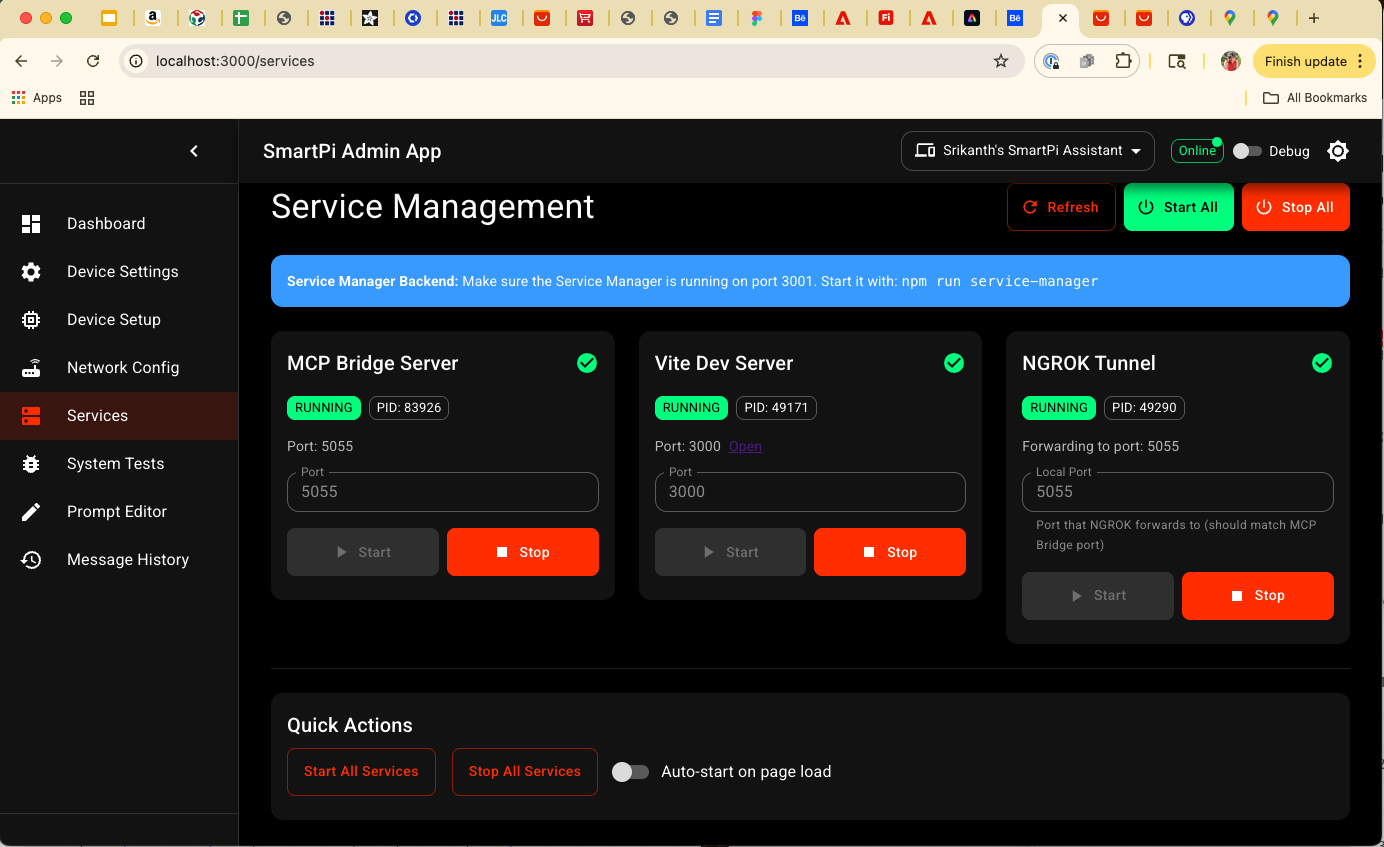
Service Management: Control panel for NGROK, MCP Bridge, and Vite services with live status, ports, and quick start/stop actions.
System Tests
The System Tests page runs an orchestrated test suite across the entire pipeline: device connectivity, N8N webhook, NGROK tunnel, MCP bridge health, and end-to-end message flow. Each test has a status, latency, and detailed log output to help debug failures.
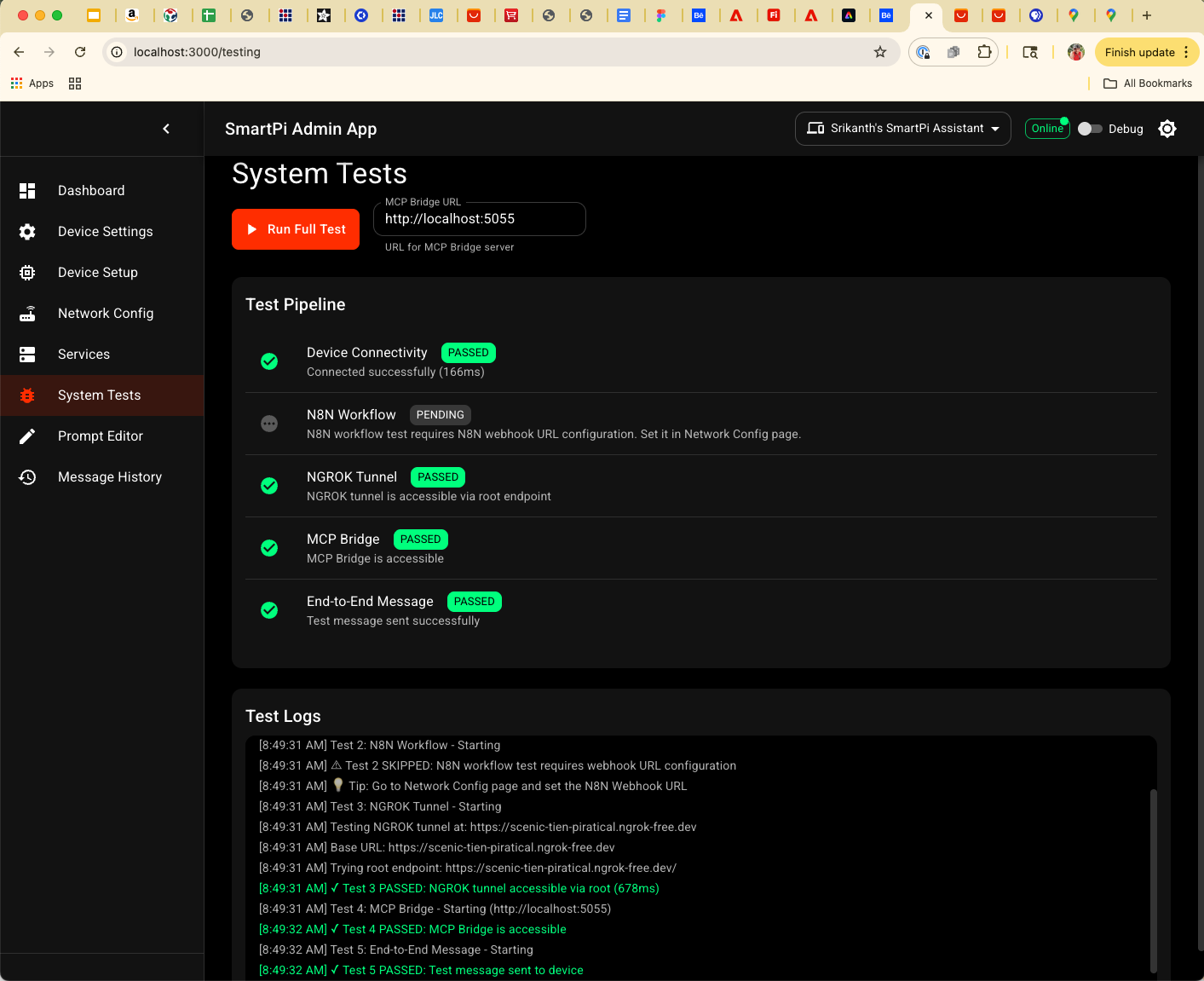
System Tests: One-click test runner for device connectivity, N8N, NGROK, MCP bridge, and end-to-end message delivery.
Prompt Editor
The Prompt Editor page is dedicated to LLM prompt management for SmartPi. It lets you view, edit, and version prompts, test them against sample payloads, and store prompt variants as JSON files in the local SmartPi storage directory.
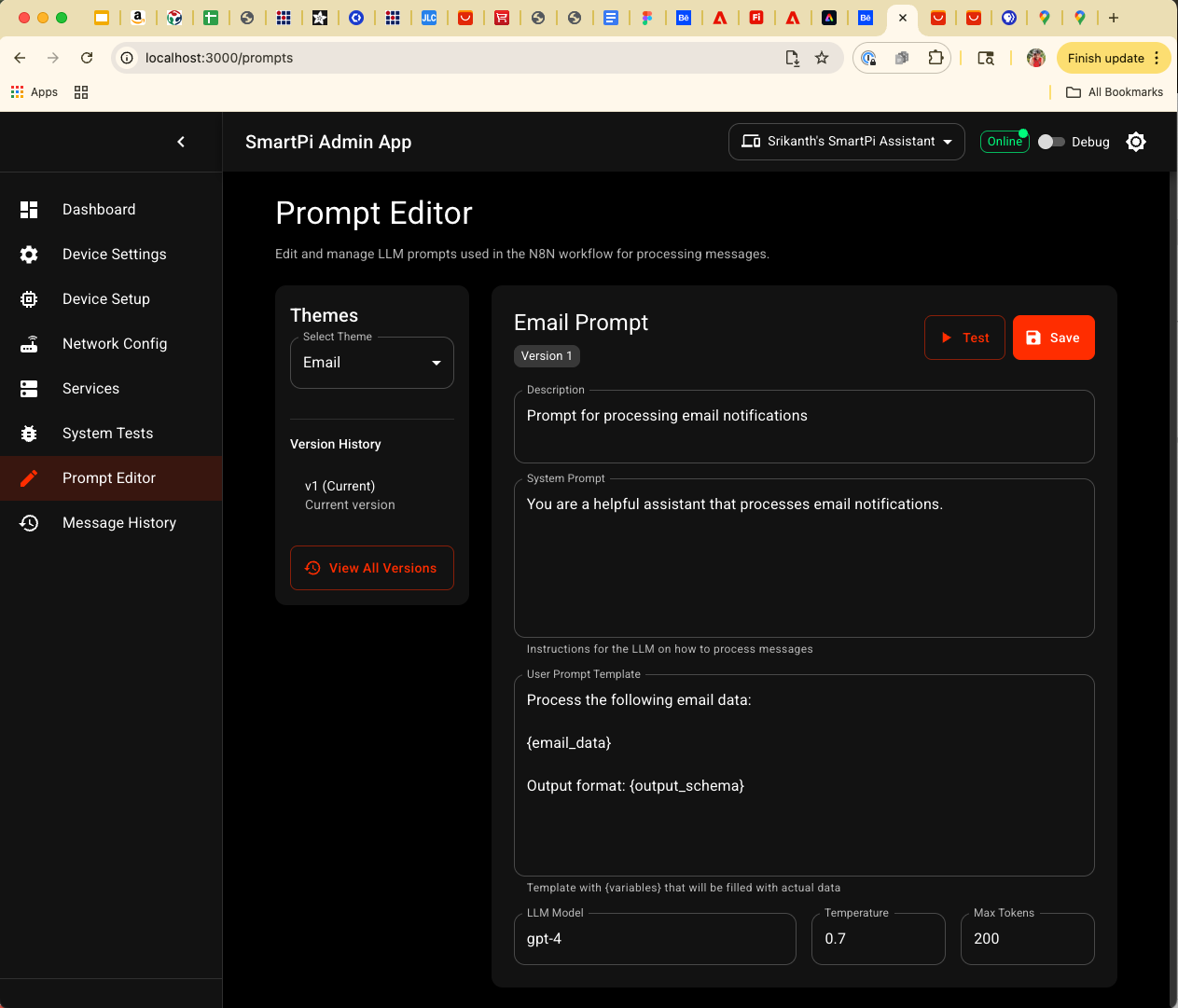
Prompt Editor: Rich editor for SmartPi LLM prompts with versioning and inline test execution.
Message History
The Message History page surfaces the JSON message logs written by the MCP bridge. It supports filtering by date range, theme, priority, and text search; provides quick filters like Today/Yesterday/Last 7 days; and includes a bulk delete action for the currently filtered set. Each entry shows the original event timestamp (e.g., when an email arrived) rather than when it was pushed to the device.
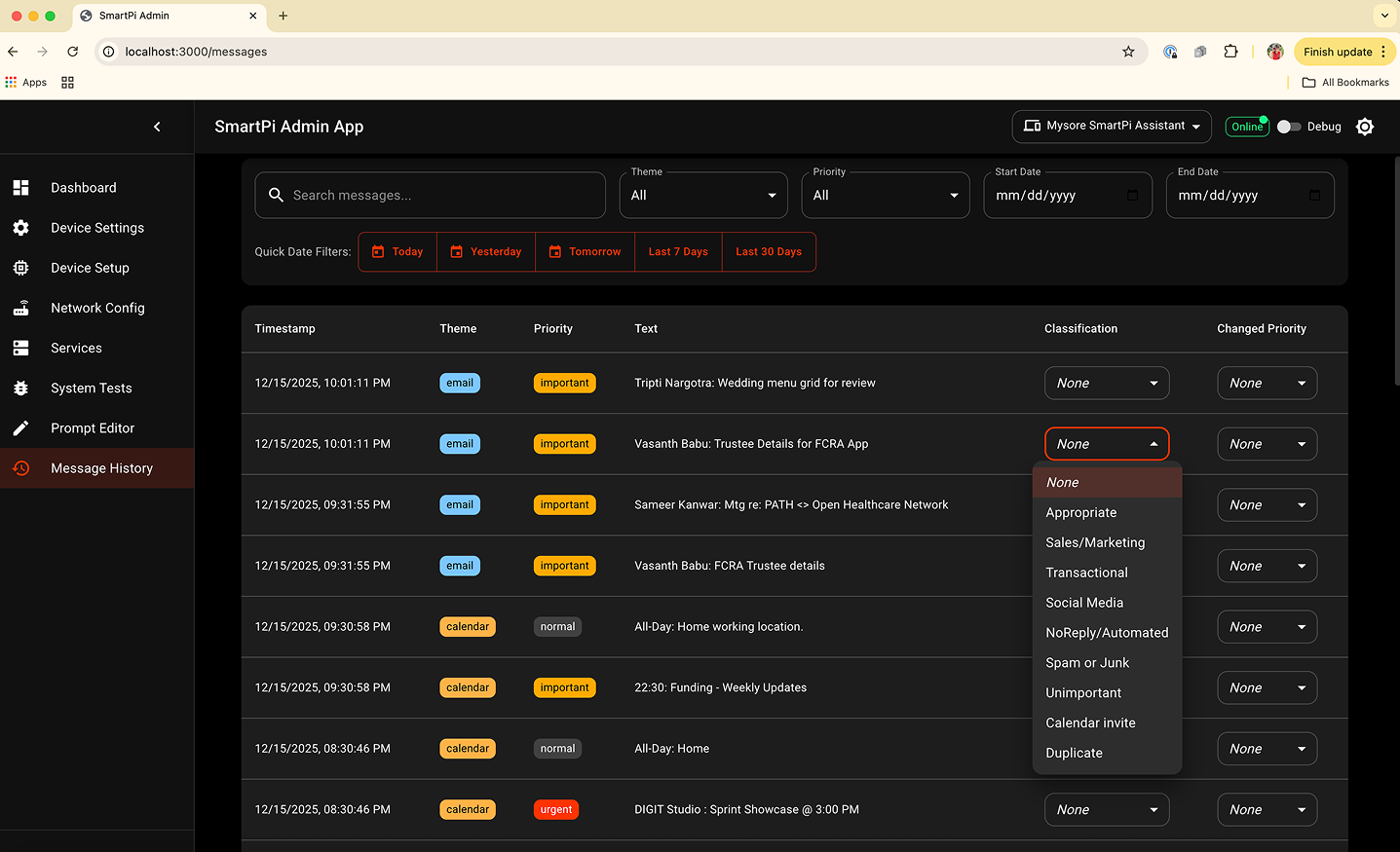
Message History: Filterable log of messages sent through the system, with per-message metadata, date shortcuts, and a bulk delete action scoped to the current filters.
06 · Key Design Features
Form Validation & User Feedback
- Real-time Validation: Input validation with immediate feedback
- Helper Text: Contextual help text below each form field
- Unsaved Changes Alert: Visual indicator when settings have been modified
- Save/Reset Actions: Clear action buttons with Material Design styling
Input Source Cards
Each input source (Email, Calendar, Weather, Slack) is presented as a card with:
- Color-coded Icons: Unique color scheme per input type for visual distinction
- Enable/Disable Toggle: Prominent switch at the top of each card
- Collapsible Configuration: Settings hidden when input is disabled
- Test Functionality: Test button next to alert sound dropdown for immediate feedback
Responsive Behavior
The interface adapts to screen size:
- Mobile: Bottom navigation replaces sidebar, single-column forms, simplified controls
- Tablet: Mini drawer (icons only), two-column grids, horizontal scrolling tabs
- Desktop: Full sidebar navigation, multi-column layouts, all features visible
07 · User Experience Enhancements
State Management
- Unsaved Changes Tracking: Visual indicator when settings differ from saved state
- Form State Persistence: Settings preserved during tab navigation
- Device Status Polling: Automatic status updates every 5 seconds
Error Handling
- Connection Timeout: 5-second timeout with retry logic
- User-friendly Error Messages: Material Snackbar alerts for errors
- Network Error Detection: Distinguishes device errors from network issues
- Recovery Suggestions: Actionable error messages with next steps
Accessibility Features
- Keyboard Navigation: Full keyboard support for all controls
- Screen Reader Support: ARIA labels and semantic HTML
- Focus Management: Clear focus indicators with Material ripple
- High Contrast Mode: Supports system high contrast settings
08 · Implementation Details
Component Architecture
The application follows a modular component structure:
- Layout Components: AppHeader, AppDrawer, BottomNav, MainLayout
- Settings Components: SettingsPage with tabbed interface
- Shared Components: DeviceSelector, StatusIndicator, ConfirmDialog
- Utility Libraries: API client, storage manager, form validators
API Communication
Direct HTTP/REST communication with SmartPi device:
- Base URL: Configurable device IP and port
- Endpoints: /status, /config, /power, /device/restart, /wifi/*, etc.
- Request/Response: JSON format with error handling
- Retry Logic: Exponential backoff for failed requests
Local Storage Strategy
Current implementation uses browser localStorage for:
- Device discovery and selection
- UI preferences (theme mode, auto-refresh)
- Test history (last 50 results)
- Configuration backups
Planned migration to local filesystem JSON files for configuration profiles, message logs, and prompt management. This will enable better backup/restore capabilities and profile management.
09 · Testing & Validation
Development Testing
- Standalone HTML Demo: Created
settings-demo.htmlfor UI/UX review without build process - Component Isolation: Each component tested independently
- Responsive Testing: Verified across mobile, tablet, and desktop breakpoints
- Browser Compatibility: Tested on Chrome, Firefox, Safari, Edge
User Testing
- Intuitive Navigation: Tab-based organization reduces cognitive load
- Clear Visual Hierarchy: Material Design elevation and spacing guide attention
- Immediate Feedback: Test buttons, status indicators, and validation messages
- Error Recovery: Clear error messages with actionable next steps
10 · Future Enhancements
Planned features for future iterations:
- Prompt Editor: UI for editing and testing LLM prompts used in N8N workflow
- Message History: View and search through processed messages for debugging
- Configuration Profiles: Save/load named configuration profiles
- Firmware Management: Upload and flash .uf2 firmware files via File System Access API
- System Testing: Comprehensive test suite for device connectivity and message flow
- Analytics Dashboard: Visualize message statistics and device usage
11 · Conclusion
The SmartPi Admin Web App provides a comprehensive, user-friendly interface for managing the SmartPi Assistant device. Built with Material Design 3 principles, the application offers:
- ✅ Intuitive Configuration: Tab-based organization with clear visual hierarchy
- ✅ Responsive Design: Seamless experience across mobile, tablet, and desktop
- ✅ Accessibility: WCAG 2.1 Level AA compliant with keyboard and screen reader support
- ✅ Modern Architecture: React + TypeScript + Material-UI for maintainability and extensibility
- ✅ User Experience: Real-time feedback, error handling, and state management
The application successfully bridges the gap between cloud services, local infrastructure, and embedded devices, providing a single interface for complete SmartPi ecosystem management. System integration details with N8N workflow and MCP bridge server will be documented upon completion of the integration implementation.