head 1.84;
access;
symbols;
locks
www-data:1.84; strict;
comment @# @;
1.84
date 2005.05.16.06.39.39; author www-data; state Exp;
branches;
next 1.83;
1.83
date 2005.05.16.06.37.09; author www-data; state Exp;
branches;
next 1.82;
1.82
date 2005.05.16.06.35.14; author www-data; state Exp;
branches;
next 1.81;
1.81
date 2005.05.16.04.24.14; author www-data; state Exp;
branches;
next 1.80;
1.80
date 2005.05.16.04.21.51; author www-data; state Exp;
branches;
next 1.79;
1.79
date 2005.05.16.04.05.38; author www-data; state Exp;
branches;
next 1.78;
1.78
date 2005.05.13.19.29.30; author www-data; state Exp;
branches;
next 1.77;
1.77
date 2005.05.13.19.26.57; author www-data; state Exp;
branches;
next 1.76;
1.76
date 2005.05.13.19.21.48; author www-data; state Exp;
branches;
next 1.75;
1.75
date 2005.05.13.19.18.08; author www-data; state Exp;
branches;
next 1.74;
1.74
date 2005.05.13.19.17.19; author www-data; state Exp;
branches;
next 1.73;
1.73
date 2005.05.13.19.11.27; author www-data; state Exp;
branches;
next 1.72;
1.72
date 2005.05.13.19.07.53; author www-data; state Exp;
branches;
next 1.71;
1.71
date 2005.05.13.19.04.43; author www-data; state Exp;
branches;
next 1.70;
1.70
date 2005.05.13.19.00.49; author www-data; state Exp;
branches;
next 1.69;
1.69
date 2005.05.13.18.51.35; author www-data; state Exp;
branches;
next 1.68;
1.68
date 2005.05.13.18.48.04; author www-data; state Exp;
branches;
next 1.67;
1.67
date 2005.05.13.18.46.30; author www-data; state Exp;
branches;
next 1.66;
1.66
date 2005.05.13.18.45.52; author www-data; state Exp;
branches;
next 1.65;
1.65
date 2005.05.13.18.39.46; author www-data; state Exp;
branches;
next 1.64;
1.64
date 2005.05.13.18.39.14; author www-data; state Exp;
branches;
next 1.63;
1.63
date 2005.05.13.18.36.38; author www-data; state Exp;
branches;
next 1.62;
1.62
date 2005.05.13.18.26.49; author www-data; state Exp;
branches;
next 1.61;
1.61
date 2005.05.13.17.37.37; author www-data; state Exp;
branches;
next 1.60;
1.60
date 2005.05.13.17.36.25; author www-data; state Exp;
branches;
next 1.59;
1.59
date 2005.05.13.17.34.15; author www-data; state Exp;
branches;
next 1.58;
1.58
date 2005.05.13.17.33.43; author www-data; state Exp;
branches;
next 1.57;
1.57
date 2005.05.13.17.33.20; author www-data; state Exp;
branches;
next 1.56;
1.56
date 2005.05.13.17.31.00; author www-data; state Exp;
branches;
next 1.55;
1.55
date 2005.05.13.17.29.50; author www-data; state Exp;
branches;
next 1.54;
1.54
date 2005.05.13.17.26.41; author www-data; state Exp;
branches;
next 1.53;
1.53
date 2005.05.13.17.25.49; author www-data; state Exp;
branches;
next 1.52;
1.52
date 2005.05.13.17.25.09; author www-data; state Exp;
branches;
next 1.51;
1.51
date 2005.05.13.17.24.39; author www-data; state Exp;
branches;
next 1.50;
1.50
date 2005.05.13.17.24.08; author www-data; state Exp;
branches;
next 1.49;
1.49
date 2005.05.13.17.22.39; author www-data; state Exp;
branches;
next 1.48;
1.48
date 2005.05.13.17.22.18; author www-data; state Exp;
branches;
next 1.47;
1.47
date 2005.05.13.17.21.38; author www-data; state Exp;
branches;
next 1.46;
1.46
date 2005.05.13.17.20.42; author www-data; state Exp;
branches;
next 1.45;
1.45
date 2005.05.13.17.19.23; author www-data; state Exp;
branches;
next 1.44;
1.44
date 2005.05.13.17.18.59; author www-data; state Exp;
branches;
next 1.43;
1.43
date 2005.05.13.17.16.13; author www-data; state Exp;
branches;
next 1.42;
1.42
date 2005.05.13.17.14.44; author www-data; state Exp;
branches;
next 1.41;
1.41
date 2005.05.13.17.13.14; author www-data; state Exp;
branches;
next 1.40;
1.40
date 2005.05.13.07.01.30; author www-data; state Exp;
branches;
next 1.39;
1.39
date 2005.05.13.04.47.05; author www-data; state Exp;
branches;
next 1.38;
1.38
date 2005.05.13.04.44.49; author www-data; state Exp;
branches;
next 1.37;
1.37
date 2005.05.13.04.29.15; author www-data; state Exp;
branches;
next 1.36;
1.36
date 2005.05.13.04.27.50; author www-data; state Exp;
branches;
next 1.35;
1.35
date 2005.05.13.04.26.53; author www-data; state Exp;
branches;
next 1.34;
1.34
date 2005.05.13.04.14.29; author www-data; state Exp;
branches;
next 1.33;
1.33
date 2005.05.13.04.08.47; author www-data; state Exp;
branches;
next 1.32;
1.32
date 2005.05.13.04.06.47; author www-data; state Exp;
branches;
next 1.31;
1.31
date 2005.05.13.03.58.03; author www-data; state Exp;
branches;
next 1.30;
1.30
date 2005.05.13.03.57.37; author www-data; state Exp;
branches;
next 1.29;
1.29
date 2005.05.13.03.51.09; author www-data; state Exp;
branches;
next 1.28;
1.28
date 2005.05.13.03.50.51; author www-data; state Exp;
branches;
next 1.27;
1.27
date 2005.05.13.03.50.29; author www-data; state Exp;
branches;
next 1.26;
1.26
date 2005.05.13.03.46.24; author www-data; state Exp;
branches;
next 1.25;
1.25
date 2005.05.13.03.45.44; author www-data; state Exp;
branches;
next 1.24;
1.24
date 2005.05.13.03.45.02; author www-data; state Exp;
branches;
next 1.23;
1.23
date 2005.05.09.18.32.06; author www-data; state Exp;
branches;
next 1.22;
1.22
date 2005.05.09.16.40.18; author www-data; state Exp;
branches;
next 1.21;
1.21
date 2005.05.09.16.39.27; author www-data; state Exp;
branches;
next 1.20;
1.20
date 2005.05.09.16.38.30; author www-data; state Exp;
branches;
next 1.19;
1.19
date 2005.05.09.16.35.25; author www-data; state Exp;
branches;
next 1.18;
1.18
date 2005.05.09.16.34.49; author www-data; state Exp;
branches;
next 1.17;
1.17
date 2005.05.02.16.48.07; author www-data; state Exp;
branches;
next 1.16;
1.16
date 2005.05.02.16.31.13; author www-data; state Exp;
branches;
next 1.15;
1.15
date 2005.05.02.16.28.03; author www-data; state Exp;
branches;
next 1.14;
1.14
date 2005.05.02.16.27.09; author www-data; state Exp;
branches;
next 1.13;
1.13
date 2005.04.25.17.33.08; author www-data; state Exp;
branches;
next 1.12;
1.12
date 2005.04.25.17.31.17; author www-data; state Exp;
branches;
next 1.11;
1.11
date 2005.04.25.17.10.22; author www-data; state Exp;
branches;
next 1.10;
1.10
date 2005.04.25.17.09.48; author www-data; state Exp;
branches;
next 1.9;
1.9
date 2005.04.25.17.09.18; author www-data; state Exp;
branches;
next 1.8;
1.8
date 2005.04.25.17.04.41; author www-data; state Exp;
branches;
next 1.7;
1.7
date 2005.04.06.19.23.13; author www-data; state Exp;
branches;
next 1.6;
1.6
date 2005.04.04.18.12.47; author www-data; state Exp;
branches;
next 1.5;
1.5
date 2005.04.04.18.12.33; author www-data; state Exp;
branches;
next 1.4;
1.4
date 2005.04.04.18.12.02; author www-data; state Exp;
branches;
next 1.3;
1.3
date 2005.04.04.18.11.39; author www-data; state Exp;
branches;
next 1.2;
1.2
date 2005.04.04.18.10.44; author www-data; state Exp;
branches;
next 1.1;
1.1
date 2005.04.04.18.10.20; author www-data; state Exp;
branches;
next ;
desc
@site.py
@
1.84
log
@site.py
@
text
@
Amy Sun's NMM Final Project
Amy's Final Project
Optimized Toolpath Generation
After many daytrips down adjacent paths, this project finds a toolpath given a 2D shape described as vertices of a polyline.
At the heart of the project, I convert an ".svg" (Scalar Vector Graphics) polyshape to a set of inequalities. Chained together, they are used for tool collision detection.
Right off the bat, I notice a few things in the polyline string. First, it's in centimeters. Second, and more importantly, there are 6 points defined instead of 5 as I expect. (I expect 5 because there are 4 vertices but the starting and ending point need to be specified explicitly to close the shape.)
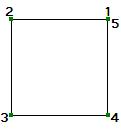
I used Open Office Draw to make the square, using the square primative. I want to start simpler, so I use the polygon tool to specify 4 vertices to make a 1" square:
Yeay! I started my drawing in the lower left hand corner and if I consider (0,0) as the upper right hand corner, the points are consistent with the order I drew them in which was clockwise from the lower left. The problem with this is that it doesn't conveniently drop into the usual coordinate system where numbers get bigger up and to the right.
Since it's entirely up to me, I'll chose to transform the points to fit the more usual coordinate system. "viewBox" conveniently tells me the min and max values for x and y so I can use this to offset the y.
Ok, so I need to write some code that
1) picks out the viewBox coords as the min and max x and y coords
2) picks out the polyline points
3) offsets the y coords of the polyline points so that (0,0) is in the lower left; without flipping the shape
line segments
Expressing the points as line segments is simply finding the line defined by two points, (x1, y1) and (x2, y2).
y = m × x + b such that x1 ≤ x ≤ x2, y1 ≤ y ≤ y2
m = slope = (y2 - y1) / (x2 - x1)
b = offset = y1 - m × x1 (or use x2, y2)
Written in standard form, A × x + B × y = C,
the inequality with C represents the side of the line that is inside the shape.
So the code also needs to:
4) calculate m and b for each pair of points, then express the equation in standard form A × x + B × y = C
inequalities
I also need the code to
5b) determine if the shape is on the "greater than" or "less than" side of the segment (ie, A x + B y ≤ C, or A x + B y ≥ C)
Graphics convention is that the vector normal points to the interior of the object. Given two points (x1, y1) and (x2, y2) in that order,
if the slope is increasing (positive), the normal vector on the "right" side is (x2, y1)
if the slope is decreasing (negative), the normal vector on the "right" side is (x1, y2)
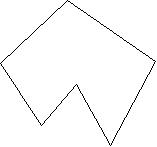
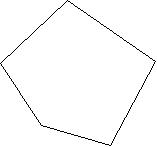
I assume that the points are given in the appropriate order. However, the polyline points are recorded in the order that I drew them in. Look:
So in order to figure out which side is "in", I'll also need to make sure I am travelling the vertices in the clockwise direction.
5a) reorganize points so they are travelled in the clockwise direction
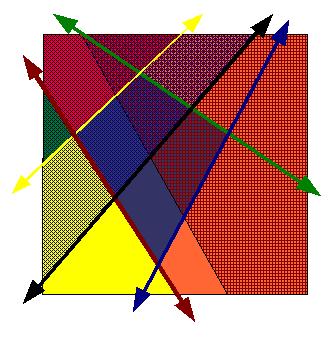
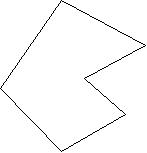
Finally, the code should output the inequalities as a list. Later, the inequalities are strung together into clauses. The union of all these segments is a big mess while the intersection isn't right either - consider the case of this shape where the intersection of the lines results in the very small shape just under the green and yellow lines.
1) pick out the viewBox coords as the min and max x and y coords
2) pick out the polyline points
3) offset the y coords of the polyline points so that (0,0) is in the lower left; without flipping the shape
4) calculate m and b for each pair of points, then express the equation in standard form A x + B y = C
5) reorganize points so they are travelled in the clockwise direction
6) determine if the shape is on the "greater than" or "less than" side of the segment (ie, A x + B y ≤ C, or A x + B y ≥ C)
7) output a list of inequalities in the form of Ax + By ≤ C (or ≥ as appropriate)
d121 2
a122 3
Ideally, these operations should be written as python functions so that it may be called by cam.py and further used for tool collision detection.
@
1.79
log
@site.py
@
text
@d88 1
a88 1
There is a graphics convention that the segment normal points to the interior of the object. Easy, given the two points (x1, y1) and (x2, y2) in that order,
d95 1
a95 1
I assume that the points are given in the appropriate order, meaning that if the points are travelling clockwise, However, the polyline points are recorded in the order that I drew them in. Look:
d113 1
a113 1
Finally, the code should output the inequalities as a list. But wait... the union of all these segments is a big mess. The intersection isn't right either. Consider the case of this shape where the intersection of the lines results in the very small shape just under the green and yellow lines.
@
1.78
log
@site.py
@
text
@d3 1
d5 1
a6 3
a13 1
a17 2
4) calculate m and b for each pair of points
d86 1
a86 1
I also need the code to
5) record if the shape is on the "greater than" or "less than" side of the segment
d88 8
a95 1
Hmm, figuring out which side of the line segment is "in" isn't that easy. There is a graphics convention that the segment normal points to the interior of the object. However, the polyline points are recorded in the order that I drew them in. Look:
d111 1
a111 2
6) reorganize points so they are travelled in the clockwise direction
I'll ignore that for the moment and get on to the next thing I'm not so sure about, making the inequality statement. In the case of the square, by inspection
d113 17
d131 6
a136 3
@
1.77
log
@site.py
@
text
@d72 1
a72 1
d85 2
a86 2
4) calculate m and b for each pair of points
d88 2
a89 2
I also need the code to
5) record if the shape is on the "greater than" or "less than" side of the segment
d106 1
a106 1
6) reorganize points so they are travelled in the clockwise direction
@
1.76
log
@site.py
@
text
@d68 1
a68 1
@
1.75
log
@site.py
@
text
@d68 1
a68 1
5) record if the shape is on the "greater than" or "less than" side of the segment
d106 1
a106 1
6) reorganize points so they are travelled in the clockwise direction
@
1.72
log
@site.py
@
text
@d72 1
a72 1
4) records if the shape is on the "greater than" or "less than" side of the segment
d86 1
a86 1
5) calculate m and b for each pair of points
d89 3
a91 1
Hmm, figuring out which side of the line segment is "in" isn't that easy. The polyline points are recorded in the order that I drew them in. Look:
d106 2
a107 1
@
1.71
log
@site.py
@
text
@d82 1
a82 1
b = y1 - m × x1 (or use x2, y2)
@
1.70
log
@site.py
@
text
@d78 1
a78 1
y = m * x + b such that x1 ≤ x ≤ x2, y1 ≤ y ≤ y2
d82 1
a82 1
b = y1 - m * x1 (or use x2, y2)
@
1.69
log
@site.py
@
text
@d78 1
a78 1
y = m * x + b such that x1 <= x <= x2, y1 <= y <= y2
@
1.68
log
@site.py
@
text
@d84 4
@
1.67
log
@site.py
@
text
@d78 1
a78 1
y = m * x + b
@
1.66
log
@site.py
@
text
@d77 1
a77 1
a78 1
@
1.65
log
@site.py
@
text
@d75 12
a86 2
Inequalities
Hmm, that last point isn't easy. The polyline points are recorded in the order that I drew them in. Look:
@
1.64
log
@site.py
@
text
@d75 1
d91 1
a91 1
Inequalities
@
1.63
log
@site.py
@
text
@d5 1
a5 1
@
1.62
log
@site.py
@
text
@d30 1
@
1.61
log
@site.py
@
text
@d89 2
a90 1
I'll ignore that for the moment and get on to the next thing I'm not so sure about, making the inequality statement. In the case of the square,
@
1.60
log
@site.py
@
text
@d50 1
a50 1
BoilerBots
d26 1
@
1.42
log
@site.py
@
text
@d1 3
d5 39
d117 6
a122 1
@
1.41
log
@site.py
@
text
@d1 1
a1 50
Final Project
@
1.40
log
@site.py
@
text
@d1 50
@
1.39
log
@site.py
@
text
@a64 1
d67 3
d71 3
@
1.38
log
@site.py
@
text
@d40 1
a40 1
Yeay! I started my drawing in the lower left hand corner and if I consider (0,0) as the upper right hand corner, the points are consistent with the order I drew them in. The problem with this is that it doesn't conveniently drop into the usual coordinate system where numbers get bigger up and to the right.
d58 7
@
1.37
log
@site.py
@
text
@d53 8
a60 1
Since it's entirely up to me, I'll chose to transform the points to fit the more usual coordinate system. "viewBox" conveniently tells me the min and max values for x and y so I can use this to offset the y.
@
1.36
log
@site.py
@
text
@d11 1
a11 1
d28 1
a28 1
@
1.35
log
@site.py
@
text
@d48 3
a50 3
2) picks out the polyline points
3) offsets the y coords of the polyline points so that (0,0) is in the lower left; without flipping the shape
4) records if the shape is on the "greater than" or "less than" side of the segment
a52 5
edit
@
1.34
log
@site.py
@
text
@d43 16
@
1.33
log
@site.py
@
text
@d22 2
a23 2
Right off the bat, I notice a few things. First, it's in centimeters. Second, and more importantly, there are 6 points defined instead of 5 as I expect. (I expect 5 because there are 4 vertices but the starting and ending point need to be specified explicitly to close the shape.)
d39 4
@
1.32
log
@site.py
@
text
@d30 7
a36 1
@
1.31
log
@site.py
@
text
@d5 1
a5 1
After many daytrips down adjacent paths, this project finds a toolpath given a 2D shape described as vertices of a polyshape.
d23 12
@
1.30
log
@site.py
@
text
@d10 1
a10 1
@
1.29
log
@site.py
@
text
@d10 1
a10 1
@
1.28
log
@site.py
@
text
@d18 2
a19 2
@
1.27
log
@site.py
@
text
@d15 3
a17 3
 @
1.82
log
@site.py
@
text
@a27 2
@
1.82
log
@site.py
@
text
@a27 2


 @
1.77
log
@site.py
@
text
@d72 1
a72 1
d85 2
a86 2
@
1.77
log
@site.py
@
text
@d72 1
a72 1
d85 2
a86 2
 d45 1
a45 1
d45 1
a45 1


