
Aijia Yao
MIT EECS • HTMAA 2025
Week 12 - Networking and Communication
November 2025
This week was mainly about wireless communication.
What I Did
- For group assignment, we have done the networking in Machine Week, where we had Python scripts handled object recognition and motion planning, while a Flask server provided the communication layer to interface with the robot’s ESP32 camera.
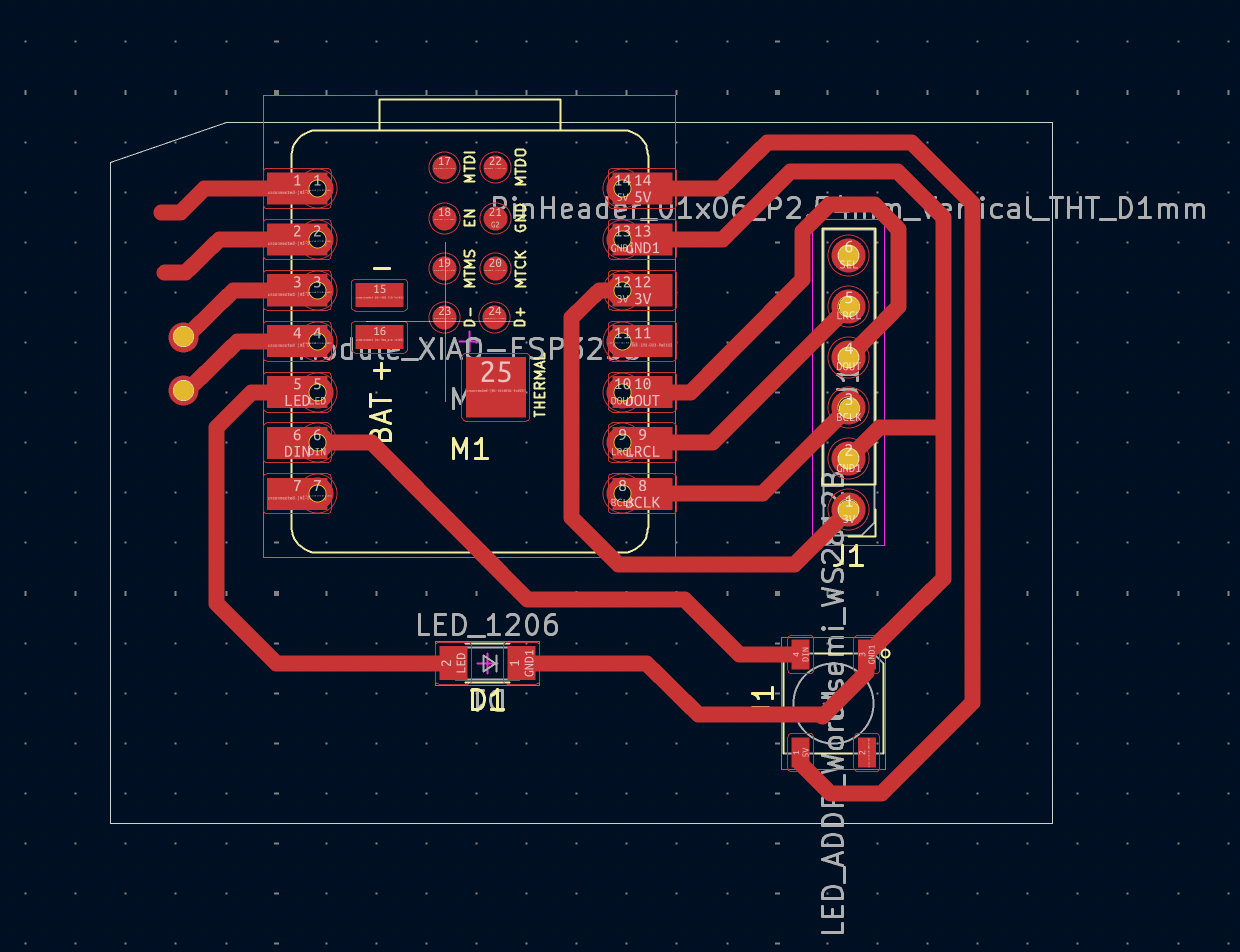
- Made a new PCB to switch from RP2040 design to XIAO-ESP32-S3.
PCB Design
Since all my previous PCB used XIAO-RP2040 as the microcontroller, to achieve wireless communication, I just modify the PCB based on the design in Week 8, it was almost the same except switching from RP2040 to XIAO_ESP32S3.
Testing and Integration
- Assembled the PCB and first connected with cable to test with Arduino IDE.
- For wireless connection, I put the led to test by sending control to change the color through wifi.
Below is a demo video of the wireless control of the led color:
The code for this wireless test is as followed.
#include <WiFi.h>>
#include <WebServer.h>>
#include <Adafruit_NeoPixel.h>
// ==== NeoPixel config ====
#define LED_PIN 6 // DIN connected to GPIO6
#define NUM_PIXELS 1 // number of LEDs
#define BRIGHTNESS 80 // 0–255
Adafruit_NeoPixel pixels(NUM_PIXELS, LED_PIN, NEO_GRB + NEO_KHZ800);
// ==== WiFi AP config ====
const char* ap_ssid = "SSID";
const char* ap_password = "PASSWORD";
WebServer server(80);
// ---- Helper: set LED color ----
void setColor(uint8_t r, uint8_t g, uint8_t b) {
pixels.setPixelColor(0, pixels.Color(r, g, b));
pixels.show();
}
// ---- HTTP handlers ----
void handleRoot() {
String html = R"(
ESP32 LED Control
ESP32 NeoPixel Control
Click a color:
You can also call /set?r=R&g=G&b=B manually.
)";
server.send(200, "text/html", html);
}
void handleSet() {
// get r, g, b from URL query, default 0
int r = server.hasArg("r") ? server.arg("r").toInt() : 0;
int g = server.hasArg("g") ? server.arg("g").toInt() : 0;
int b = server.hasArg("b") ? server.arg("b").toInt() : 0;
// clamp 0–255
if (r < 0) r = 0; if (r > 255) r = 255;
if (g < 0) g = 0; if (g > 255) g = 255;
if (b < 0) b = 0; if (b > 255) b = 255;
setColor((uint8_t)r, (uint8_t)g, (uint8_t)b);
String resp = "Set color to R=" + String(r) +
" G=" + String(g) +
" B=" + String(b) + "\n";
resp += "Back to control page";
server.send(200, "text/html", resp);
}
void handleNotFound() {
server.send(404, "text/plain", "Not found");
}
void setup() {
Serial.begin(115200);
delay(1000);
// NeoPixel init
pixels.begin();
pixels.setBrightness(BRIGHTNESS);
setColor(0, 0, 0); // start off
// WiFi AP mode
WiFi.mode(WIFI_AP);
bool ap_ok = WiFi.softAP(ap_ssid, ap_password);
if (ap_ok) {
Serial.println("AP started");
Serial.print("SSID: ");
Serial.println(ap_ssid);
Serial.print("Password: ");
Serial.println(ap_password);
Serial.print("IP: ");
Serial.println(WiFi.softAPIP()); // usually 192.168.4.1
} else {
Serial.println("AP start FAILED");
}
// HTTP routes
server.on("/", handleRoot);
server.on("/set", handleSet);
server.onNotFound(handleNotFound);
server.begin();
Serial.println("HTTP server started");
}
void loop() {
server.handleClient();
}