Week 13 — Networking, Tiny Servers, and Scene Switching
The assignment this week was to write an application that interfaces a user with a device I made. Since I have been building the Memory Dock system, this week became a perfect moment to get deeper into how the XIAO ESP32S3 can behave as a tiny server, how it talks to the NFC reader, and how that signal can trigger a web interface that shows different Gaussian Splat viewer scenes.
I approached it by breaking everything into three parts: the hardware reading the tag, the tiny server running on the XIAO, and the browser interface that reacts whenever a tag appears or disappears. I also asked ChatGPT to help me scaffold some of the initial code structure, especially the HTML and the server routing, so I could focus on integrating it with my own logic and mapping system.
Process
Overall mechanism
The mechanism is actually pretty simple once everything is stitched together. The RC522 NFC reader picks up a tag and sends the UID to the XIAO. The XIAO then:
- updates its internal currentUid variable,
- matches the UID to a project_id,
-
serves a JSON object at
/statuslike{ present, uid, project_id }, -
and hosts an HTML page at
/that listens for updates.
The browser loads that HTML page, which includes an iframe. The page
keeps checking /status. When it sees a new
project_id, it swaps the iframe source to the
correct Gaussian Splat viewer file. When the tag is removed, the
status resets and the iframe goes back to a neutral waiting screen.
This basically turns the NFC reader into a “scene selector”. I place a token, the page loads the scene; I remove it, everything goes back to the listening mode. No buttons, no menus — just one physical gesture.
One interface for everything
For the visual interface I borrowed the layout I already use across my site: soft rounded cards, a subtle gradient background, and a large iframe area. The right column shows tag metadata, a short scene description, and a tiny log of which tag was scanned last. Even though this runs on the XIAO, the UI still feels consistent with my main website.
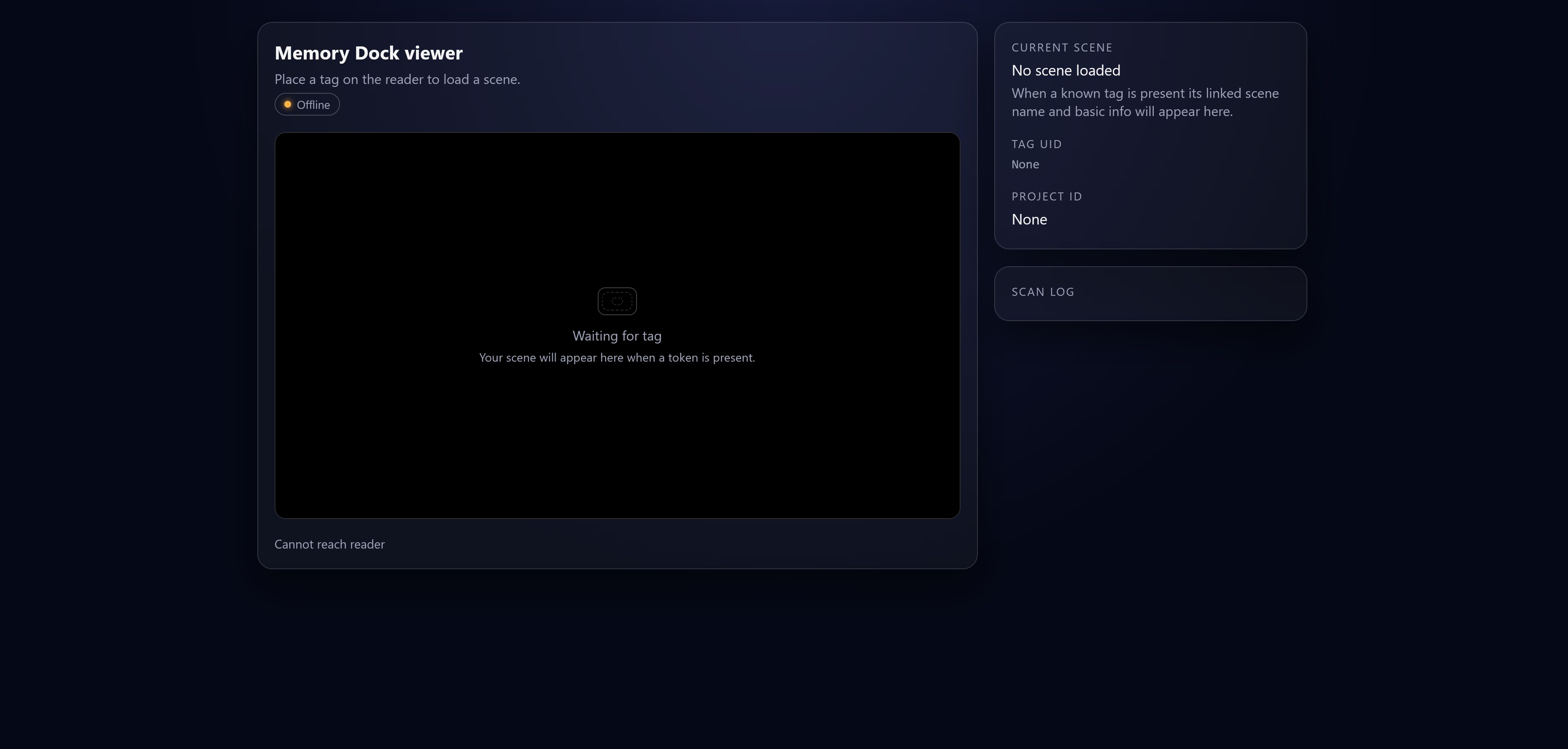
Mapping tags to scenes
Every tag has a UID string. I map that string to a short project id, and the project id links to an actual HTML file. For example:
"week4_building7": {
  title: "Building 7 third floor",
  file: "http://localhost:8000/assets/misc/LUMA_gs_Building_7_3rd_floor.html",
  size: "Supersplat export",
  note: "Week 4 capture in MIT Building 7."
}
This makes the whole system modular. I do not have to rewrite anything else — I just add a new UID and point it to a new viewer html file whenever I have another scan I want to share.
Arduino server and HTML template
Below is the main Arduino sketch I used for the tiny server, which combines WiFi setup, HTTP routing, NFC reading, and the HTML interface. I asked ChatGPT to help me generate a starting structure for this sketch and the viewer template so I could customize the mapping, styling, and behavior for my own workflow.
Arduino code (click to open)
#include <WiFi.h>
#include <WebServer.h>
// wifi
const char* ssid = "YOUR_WIFI_SSID";
const char* password = "YOUR_WIFI_PASSWORD";
WebServer server(80);
// tag state
String currentUid = "";
bool tagPresent = false;
String currentProjectId = "";
// map from uid to project id
String projectIdForUid(const String& uid) {
if (uid == "04 A1 B2 C3") {
return "week4_building7";
} else if (uid == "08 FF 10 9C") {
return "scene_two";
}
return "";
}
// html page served at "/"
const char MAIN_page[] PROGMEM = R"rawliteral(
<!DOCTYPE html>
<html lang="en">
<head>
<meta charset="UTF-8" />
<title>Memory Dock viewer</title>
<meta name="viewport" content="width=device-width, initial-scale=1" />
<style>
:root {
--bg: #050816;
--panel-bg: rgba(255, 255, 255, 0.04);
--border: rgba(255, 255, 255, 0.14);
--accent: #2d6bff;
--text: #f5f5f5;
--muted: #9ba0b5;
--radius: 16px;
--space-1: 0.35rem;
--space-2: 0.7rem;
--space-3: 1.1rem;
--space-4: 1.6rem;
}
* {
box-sizing: border-box;
}
body {
margin: 0;
font-family: system-ui, -apple-system, BlinkMacSystemFont, "Segoe UI", sans-serif;
background: radial-gradient(circle at top, #161b3a, #050816 55%);
color: var(--text);
min-height: 100vh;
display: flex;
align-items: stretch;
justify-content: center;
padding: var(--space-4) var(--space-3);
}
.shell {
width: 100%;
max-width: 1120px;
display: grid;
grid-template-columns: minmax(0, 2.3fr) minmax(0, 1fr);
gap: var(--space-3);
}
@media (max-width: 860px) {
.shell {
grid-template-columns: minmax(0, 1fr);
}
}
.card {
background: var(--panel-bg);
border-radius: var(--radius);
border: 1px solid var(--border);
box-shadow: 0 18px 40px rgba(0, 0, 0, 0.5);
padding: var(--space-3);
backdrop-filter: blur(18px);
}
header h1 {
margin: 0;
font-size: 1.25rem;
}
header p {
margin: var(--space-1) 0 0;
font-size: 0.9rem;
color: var(--muted);
}
.viewer-frame-wrap {
position: relative;
width: 100%;
padding-top: 56.25%;
border-radius: calc(var(--radius) - 4px);
overflow: hidden;
margin-top: var(--space-3);
border: 1px solid rgba(255, 255, 255, 0.18);
background: #000;
}
iframe {
position: absolute;
inset: 0;
width: 100%;
height: 100%;
border: none;
background: #000;
}
.meta-label {
font-size: 0.75rem;
text-transform: uppercase;
letter-spacing: 0.12em;
color: var(--muted);
margin-bottom: var(--space-1);
}
.meta-value {
font-size: 0.98rem;
margin-bottom: 0.25rem;
}
.meta-note {
font-size: 0.9rem;
color: var(--muted);
}
.status {
font-size: 0.82rem;
color: var(--muted);
margin-top: var(--space-3);
}
.pill {
display: inline-flex;
align-items: center;
padding: 0.2rem 0.6rem;
border-radius: 999px;
border: 1px solid rgba(255, 255, 255, 0.22);
font-size: 0.75rem;
color: var(--muted);
margin-top: var(--space-1);
}
.pill-dot {
width: 7px;
height: 7px;
border-radius: 999px;
margin-right: 0.4rem;
background: #ffb347;
box-shadow: 0 0 6px rgba(255, 179, 71, 0.9);
}
.pill.live .pill-dot {
background: #34d399;
box-shadow: 0 0 8px rgba(52, 211, 153, 0.9);
}
.right {
display: flex;
flex-direction: column;
gap: var(--space-3);
}
.log {
font-size: 0.8rem;
max-height: 260px;
overflow-y: auto;
color: var(--muted);
}
.log-item {
margin-bottom: 0.3rem;
white-space: nowrap;
text-overflow: ellipsis;
overflow: hidden;
}
.big-uid {
font-family: "SF Mono", ui-monospace, Menlo, Monaco, Consolas, "Liberation Mono", "Courier New", monospace;
font-size: 0.85rem;
color: var(--muted);
}
.placeholder {
position: absolute;
inset: 0;
display: flex;
align-items: center;
justify-content: center;
flex-direction: column;
color: var(--muted);
pointer-events: none;
font-size: 0.9rem;
}
.placeholder-icon {
width: 42px;
height: 30px;
border-radius: 8px;
border: 1px solid rgba(255, 255, 255, 0.25);
margin-bottom: var(--space-2);
position: relative;
}
.placeholder-icon::before,
.placeholder-icon::after {
content: "";
position: absolute;
inset: 4px;
border-radius: 6px;
border: 1px dashed rgba(255, 255, 255, 0.18);
}
.placeholder-icon::after {
inset: 10px 14px;
border-radius: 4px;
}
</style>
</head>
<body>
<div class="shell">
<section>
<div class="card">
<header>
<h1 id="projName">Memory Dock viewer</h1>
<p id="projNotes">Place a tag on the reader to load a scene.</p>
<div class="pill" id="livePill">
<span class="pill-dot"></span>
<span id="pillText">Idle listener</span>
</div>
</header>
<div class="viewer-frame-wrap">
<iframe id="viewerFrame" src="" title="Supersplat viewer"></iframe>
<div class="placeholder" id="placeholder">
<div class="placeholder-icon"></div>
<div>Waiting for tag</div>
<div style="font-size: 0.8rem; margin-top: 0.3rem;">
Your scene will appear here when a token is present.
</div>
</div>
</div>
<div class="status">
<span id="statusText">Connecting to reader</span>
</div>
</div>
</section>
<aside class="right">
<div class="card">
<div class="meta-label">Current scene</div>
<div class="meta-value" id="metaTitle">No scene loaded</div>
<div class="meta-value" id="metaSize"></div>
<div class="meta-note" id="metaNote">
When a known tag is present its linked scene name and basic info will appear here.
</div>
<div style="margin-top: var(--space-3);">
<div class="meta-label">Tag uid</div>
<div class="big-uid" id="metaUid">None</div>
</div>
<div style="margin-top: var(--space-3);">
<div class="meta-label">Project id</div>
<div class="meta-value" id="metaProjectId">None</div>
</div>
</div>
<div class="card">
<div class="meta-label">Scan log</div>
<div class="log" id="logList"></div>
</div>
</aside>
</div>
<script>
// url of the reader (this page lives on the same device, so root slash works)
const STATUS_URL = "/status";
// map project ids to viewer html and friendly info
// change these paths to where your viewer html actually lives
const PROJECTS = {
"week4_building7": {
title: "Building 7 third floor",
file: "http://localhost:8000/assets/misc/LUMA_gs_Building_7_3rd_floor.html",
size: "Single Supersplat export",
note: "Week 4 capture at MIT building 7 third floor."
},
"scene_two": {
title: "Second scene placeholder",
file: "http://localhost:8000/assets/misc/example_scene_two.html",
size: "Replace with real file",
note: "Add more Supersplat scenes here."
}
};
const viewerFrame = document.getElementById("viewerFrame");
const placeholder = document.getElementById("placeholder");
const projNameEl = document.getElementById("projName");
const projNotesEl = document.getElementById("projNotes");
const statusTextEl = document.getElementById("statusText");
const metaTitleEl = document.getElementById("metaTitle");
const metaSizeEl = document.getElementById("metaSize");
const metaNoteEl = document.getElementById("metaNote");
const metaUidEl = document.getElementById("metaUid");
const metaProjectIdEl = document.getElementById("metaProjectId");
const logListEl = document.getElementById("logList");
const livePill = document.getElementById("livePill");
const pillText = document.getElementById("pillText");
let lastUid = null;
async function pollStatus() {
try {
const res = await fetch(STATUS_URL);
if (!res.ok) {
throw new Error("HTTP " + res.status);
}
const data = await res.json();
handleStatus(data);
pillText.textContent = data.present ? "Live tag" : "Idle listener";
livePill.classList.toggle("live", data.present);
} catch (err) {
statusTextEl.textContent = "Cannot reach reader";
livePill.classList.remove("live");
pillText.textContent = "Offline";
} finally {
setTimeout(pollStatus, 800);
}
}
function handleStatus(data) {
statusTextEl.textContent = data.present
? "Tag detected"
: "Waiting for tag";
const uid = data.present ? data.uid : null;
const projectId = data.present ? data.project_id : "";
// if state did not change, do nothing
if (uid === lastUid) return;
lastUid = uid;
if (!uid) {
setIdleUI();
return;
}
// we have a tag
const project = PROJECTS[projectId];
if (!project) {
setUnknownUI(uid, projectId);
return;
}
setProjectUI(uid, projectId, project);
}
function setIdleUI() {
projNameEl.textContent = "Memory Dock viewer";
projNotesEl.textContent = "Place a tag on the reader to load a scene.";
metaTitleEl.textContent = "No scene loaded";
metaSizeEl.textContent = "";
metaNoteEl.textContent =
"When a known tag is present its linked scene name and basic info will appear here.";
metaUidEl.textContent = "None";
metaProjectIdEl.textContent = "None";
viewerFrame.src = "";
placeholder.style.display = "flex";
logEvent("Tag removed, back to idle");
}
function setUnknownUI(uid, projectId) {
projNameEl.textContent = "Unknown tag";
projNotesEl.textContent = "This uid is not mapped to any project yet.";
metaTitleEl.textContent = "Unknown scene";
metaSizeEl.textContent = "";
metaNoteEl.textContent = "Add this uid to your project map to link a viewer file.";
metaUidEl.textContent = uid;
metaProjectIdEl.textContent = projectId || "None";
viewerFrame.src = "";
placeholder.style.display = "flex";
logEvent("Unknown uid " + uid);
}
function setProjectUI(uid, projectId, project) {
projNameEl.textContent = project.title;
projNotesEl.textContent = project.note;
metaTitleEl.textContent = project.title;
metaSizeEl.textContent = project.size || "";
metaNoteEl.textContent = project.note || "";
metaUidEl.textContent = uid;
metaProjectIdEl.textContent = projectId || "None";
viewerFrame.src = project.file;
placeholder.style.display = "none";
logEvent("Loaded project " + projectId + " from uid " + uid);
}
function logEvent(text) {
const row = document.createElement("div");
row.className = "log-item";
const time = new Date().toLocaleTimeString();
row.textContent = "[" + time + "] " + text;
logListEl.prepend(row);
}
pollStatus();
</script>
</body>
</html>
)rawliteral";
// handlers
void handleRoot() {
server.send_P(200, "text/html", MAIN_page);
}
void handleStatus() {
String json = "{";
json += "\"present\":" + String(tagPresent ? "true" : "false");
if (tagPresent) {
json += ",\"uid\":\"" + currentUid + "\"";
json += ",\"project_id\":\"" + currentProjectId + "\"";
}
json += "}";
server.send(200, "application/json", json);
}
void setup() {
Serial.begin(115200);
delay(1000);
WiFi.begin(ssid, password);
Serial.print("Connecting to wifi");
while (WiFi.status() != WL_CONNECTED) {
delay(500);
Serial.print(".");
}
Serial.println();
Serial.print("Connected, IP: ");
Serial.println(WiFi.localIP());
server.on("/", handleRoot);
server.on("/status", handleStatus);
server.begin();
Serial.println("HTTP server started");
}
void loop() {
// here you plug in your RFID code
// for now this is placeholder logic
// example pseudo
/*
if (rfidTagDetected()) {
String uid = readUidAsString();
if (!tagPresent || uid != currentUid) {
currentUid = uid;
currentProjectId = projectIdForUid(currentUid);
tagPresent = true;
Serial.print("New tag: ");
Serial.println(currentUid);
}
} else {
if (tagPresent) {
tagPresent = false;
currentUid = "";
currentProjectId = "";
Serial.println("Tag removed");
}
}
*/
server.handleClient();
}
Once the core loop receives the UID, everything else cascades naturally. I spent most of the week tightening the mapping logic, testing different Supersplat files, and checking that the viewer updates instantly as soon as a tag is tapped on the reader.
Reflection
I really like how this system feels. The physical tag and digital scene come together in a smooth interaction. There is no UI to navigate — the tag is the interface. Technically it is pretty lightweight: one microcontroller, one JSON endpoint, and one web page that updates itself. It will be the core interaction for the Memory Dock project as I start building the actual enclosure and more scenes.