SmartPi Admin Web App
SmartPi Admin is the browser-based control panel for the SmartPi Assistant. Built with React, TypeScript, and Material Design 3, it configures the Pico W firmware, manages network settings and background services, and provides rich diagnostics and message history.
01 · Role in the Final Project
While the Pico W firmware renders messages on the 64×64 RGB matrix, the SmartPi Admin Web App is how a user actually operates the SmartPi Assistant. It centralizes:
- Device configuration (display, messages, audio, advanced firmware settings).
- Network configuration for the device, MCP bridge, NGROK, and N8N workflows.
- Service management for the local development stack (Vite, NGROK, MCP bridge server).
- System tests that verify end‑to‑end connectivity from N8N through to the LED matrix.
- Message history, logging, and future prompt‑editing workflows for the LLM layer.
02 · Dashboard
The Dashboard provides a high‑level summary of SmartPi’s current state: device health, service status, system test results, and a message activity snapshot.
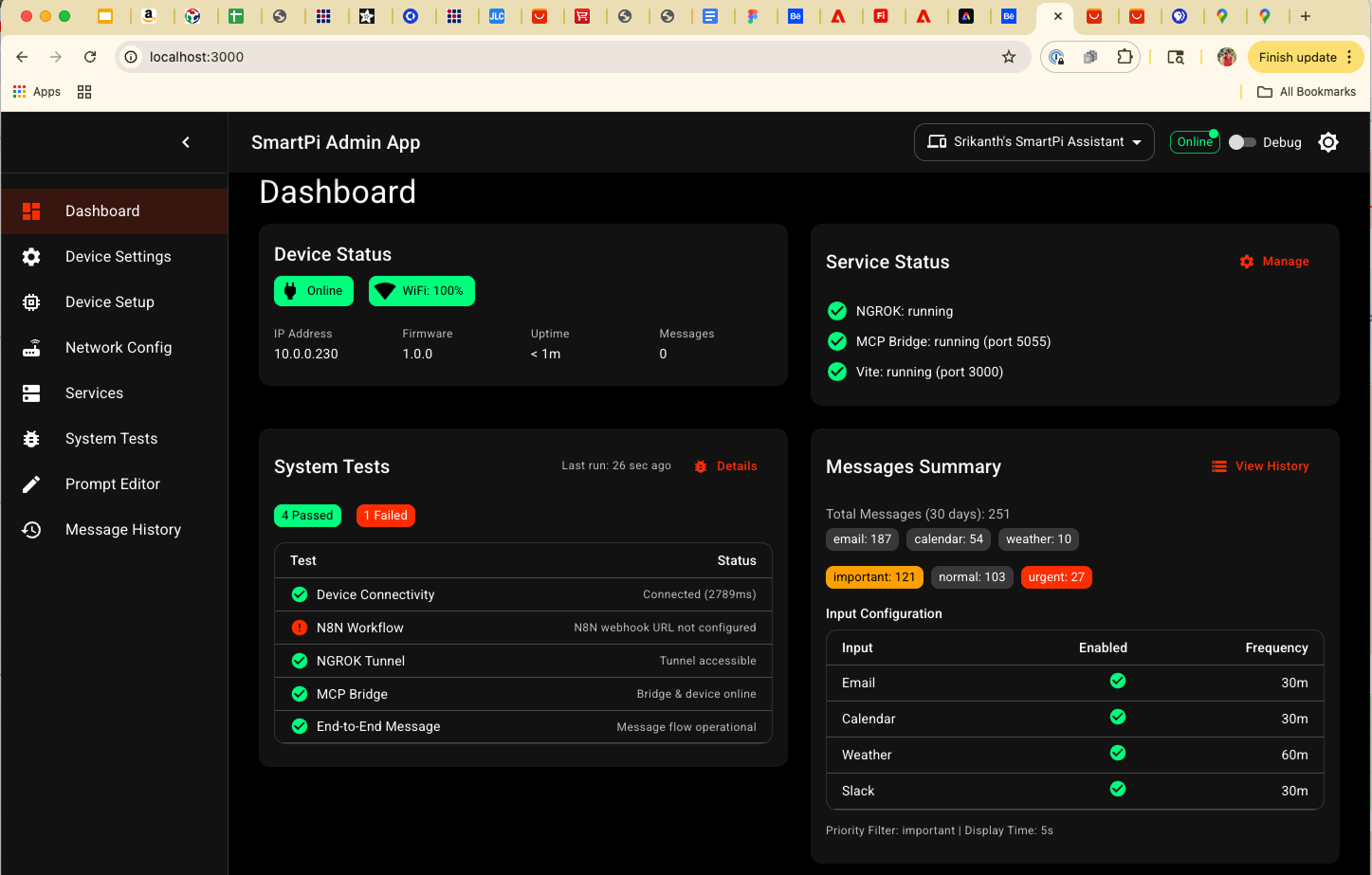
Dashboard: Central hub summarizing device health, background services, recent tests, and message activity.
03 · Core Configuration Pages
Device Settings
Device Settings exposes all of the Pico W firmware parameters that control the 64×64 matrix and how messages are rendered: hardware bit depth, width/height, rotation, line scale, max lines, margins, and theme stripe, plus message priority and display time.
Settings Requiring Device Restart
The following settings require a device restart (unplug/replug USB or use the restart button) to take effect:
- Display Hardware: Bit Depth, Width, Height, Serpentine Mode, Rotation
- Advanced: CPU Frequency
When you save changes to these settings, the Admin App will prompt you to restart the device. These parameters affect the matrix initialization and cannot be changed dynamically.
Settings Applied Immediately
The following settings are applied immediately without requiring a restart:
- Text Rendering: Line Scale, Max Lines, Line Spacing, Alignment
- Positioning: Vertical Offset, Horizontal Offset, Left Margin, Right Margin
- Display: Theme Stripe Enabled, Theme Stripe Width
- Messages: Priority Filter, Display Time
- Audio: Sound Alerts Enabled
- Advanced: Debug Flag
Changes to these settings are reflected on the display immediately after saving. The device dynamically updates its display parameters and refreshes the current message with the new settings.
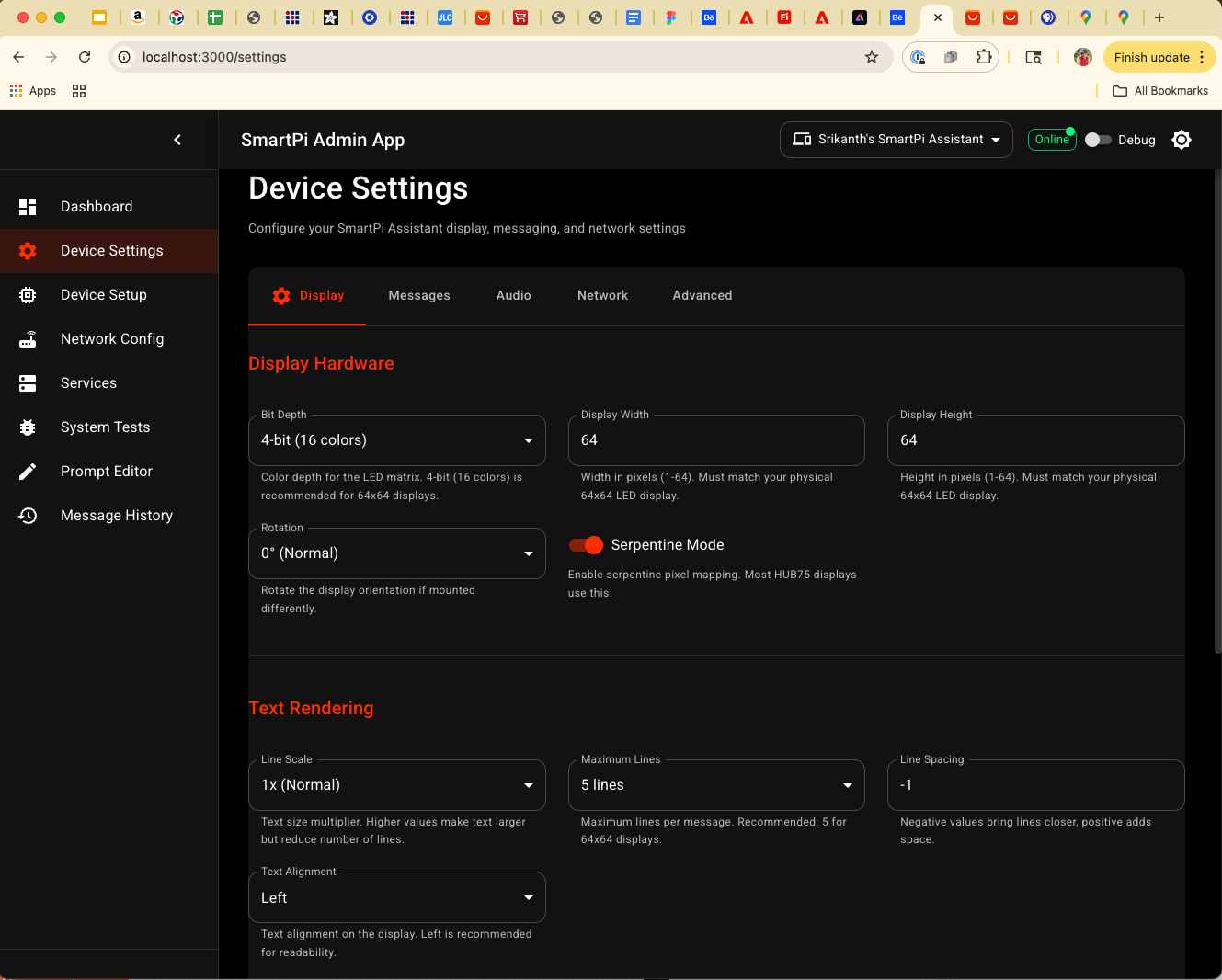
Device Settings: Complete mapping from firmware main.py configuration variables into
Material UI form controls. The app clearly indicates which settings require a restart.
Device Setup
Device Setup handles the lifecycle of SmartPi devices and local paths. It lets you pick
SMARTPI_ROOT, upload new versions of main.py or the CircuitPython UF2,
and register devices by name, IP, and port.
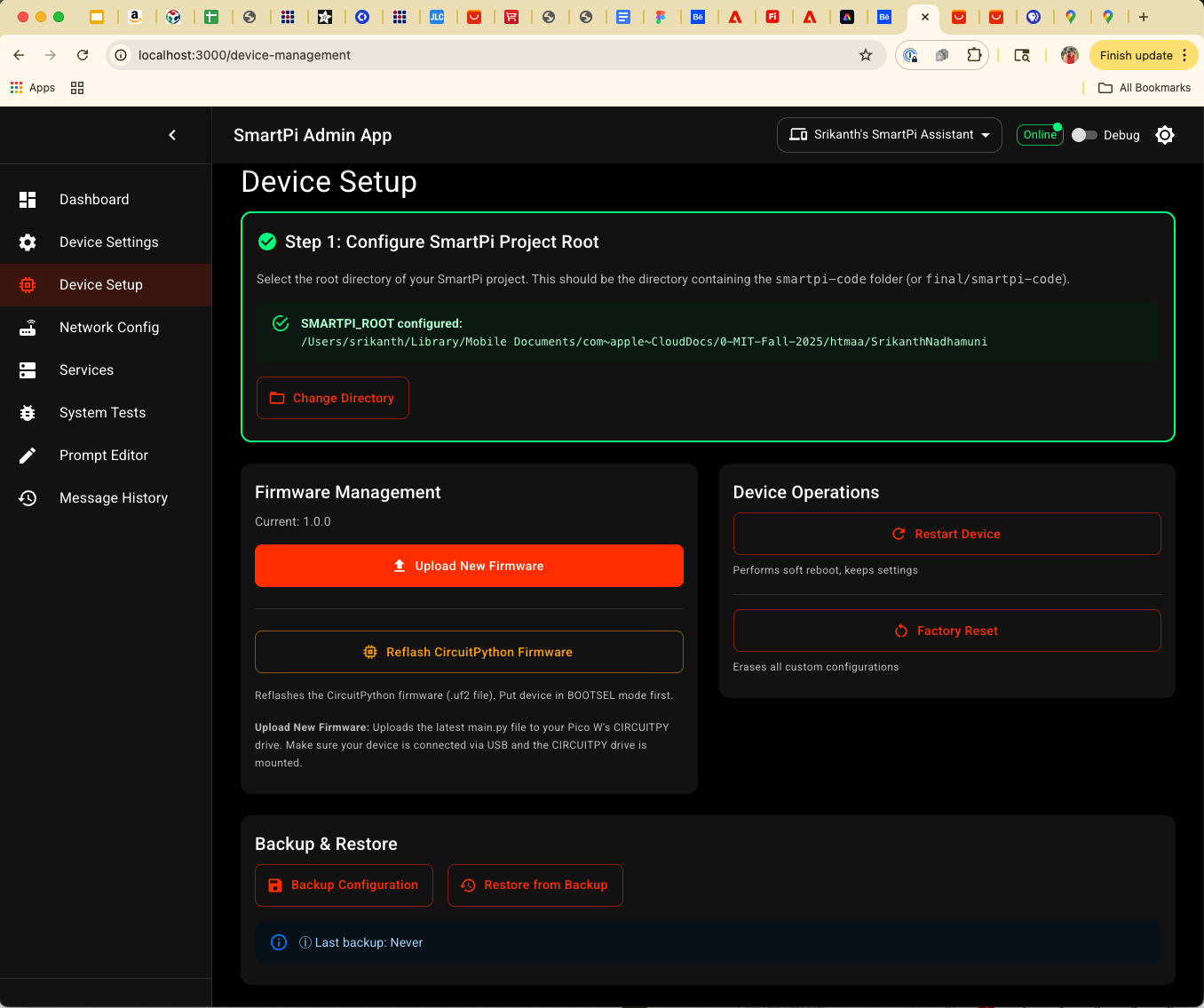
Device Setup: SMARTPI_ROOT selection, firmware upload to the Pico W, and Add Device workflow for creating entries used across the app.
Network Config
The Network Config page centralizes all IP addresses and ports for the SmartPi ecosystem and can generate config snippets for Python, shell scripts, YAML, and the Vite proxy, ensuring every component shares the same configuration source of truth.
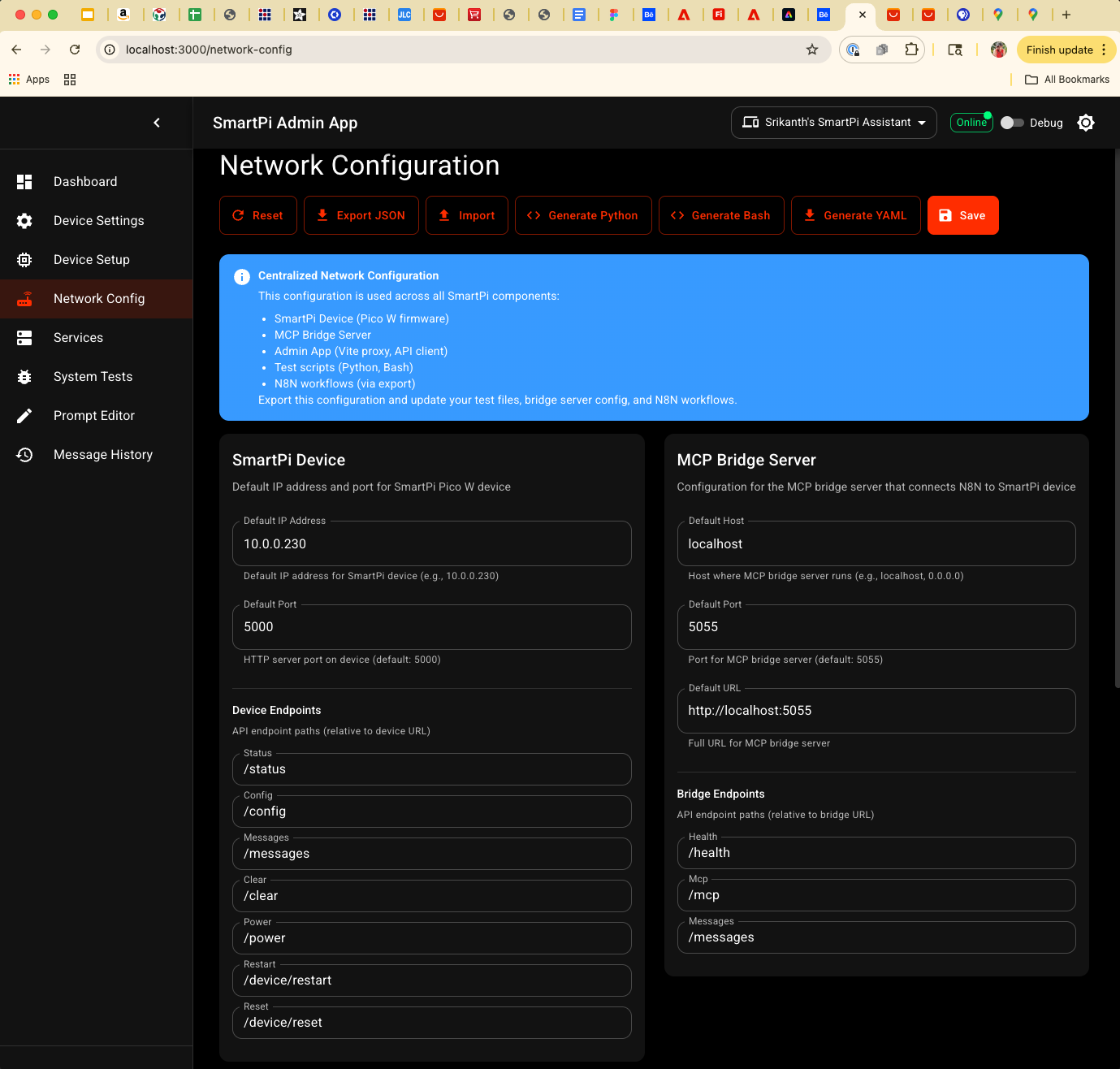
Network Config: One place to manage WiFi, device, MCP bridge, NGROK, and N8N settings for reproducible deployments.
04 · Services, Tests, and Tools
Service Management
SmartPi Admin talks to a Node.js service-manager backend to start and stop NGROK, the
MCP bridge server, and the Vite dev server. This removes the “chicken and egg” problem of having to
manually start services before using the Admin UI.
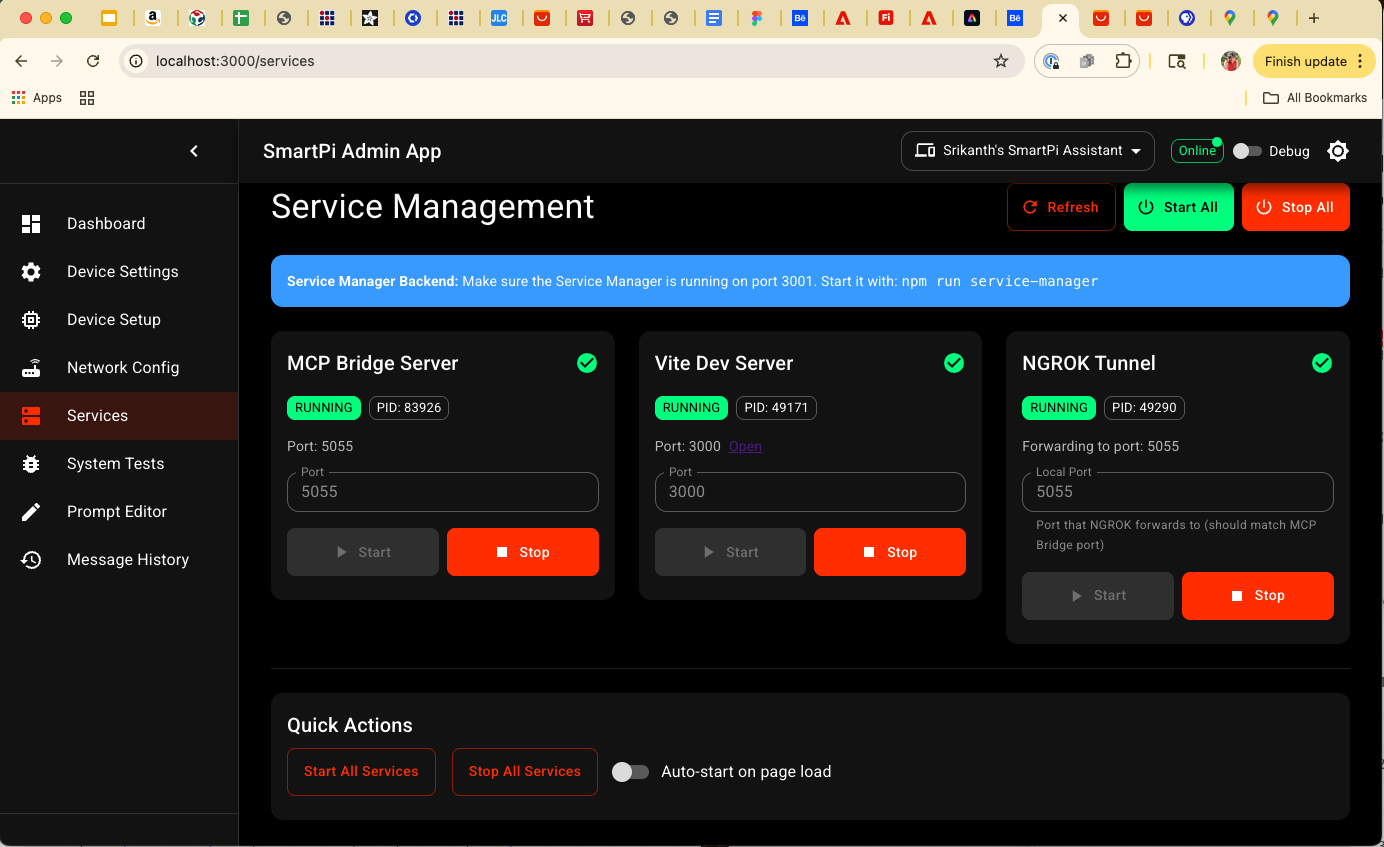
Services: Cards for NGROK, MCP Bridge, and Vite showing status, ports, and URLs with Start/Stop and Start All / Stop All controls.
System Tests
The System Tests page runs a structured test suite: device connectivity, N8N webhook access, NGROK tunnel health, MCP bridge status, and an end‑to‑end message push. Results and logs are visible in real time, and the Dashboard shows a summary.
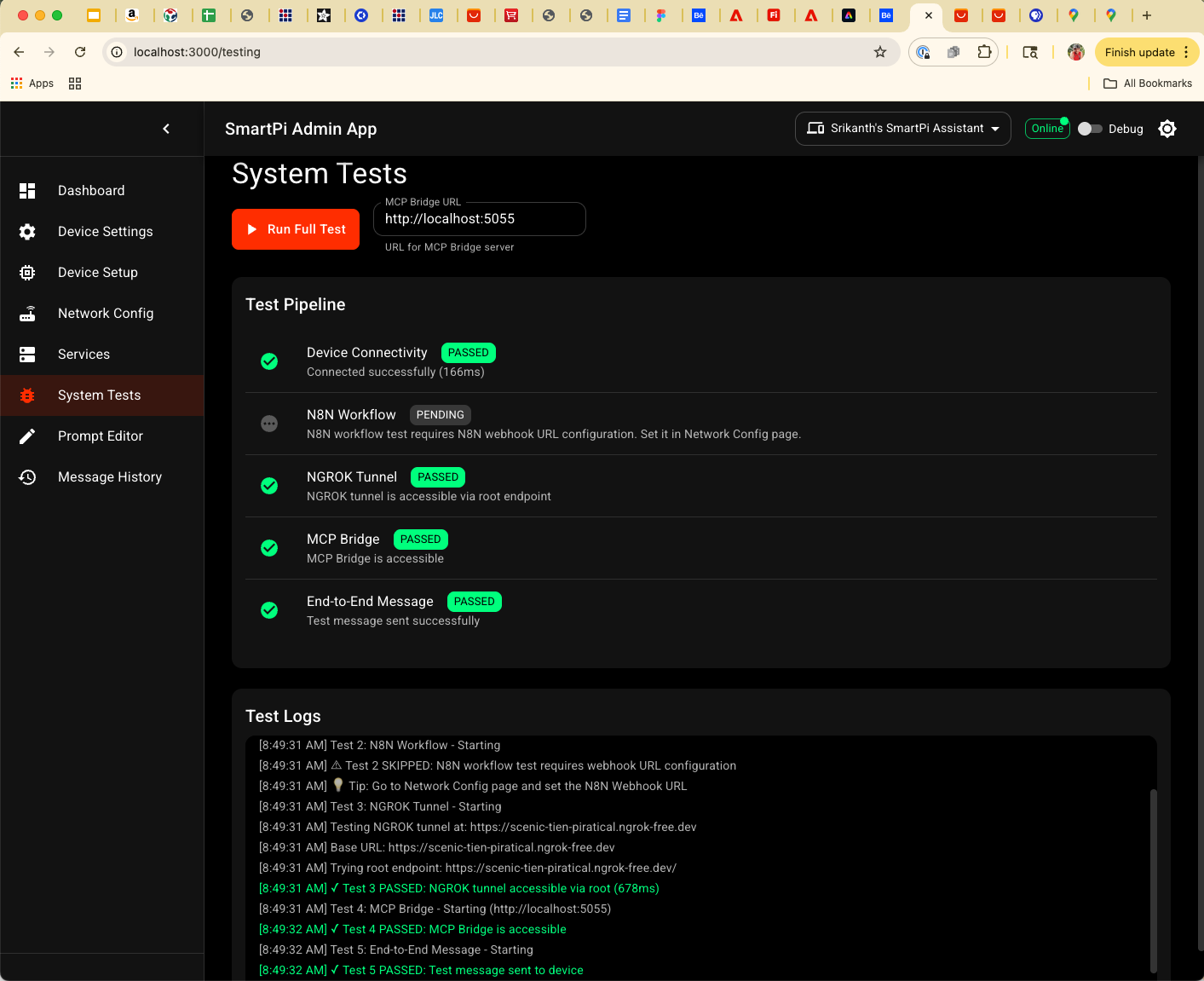
System Tests: Turn‑key diagnostics for the full SmartPi path from cloud workflow down to the Pico W.
Prompt Editor
Prompt Editor is the home for LLM prompt engineering. It lets you edit and version prompts, test them against sample JSON payloads, and save versions into local JSON files that the N8N workflows or bridge server can load.
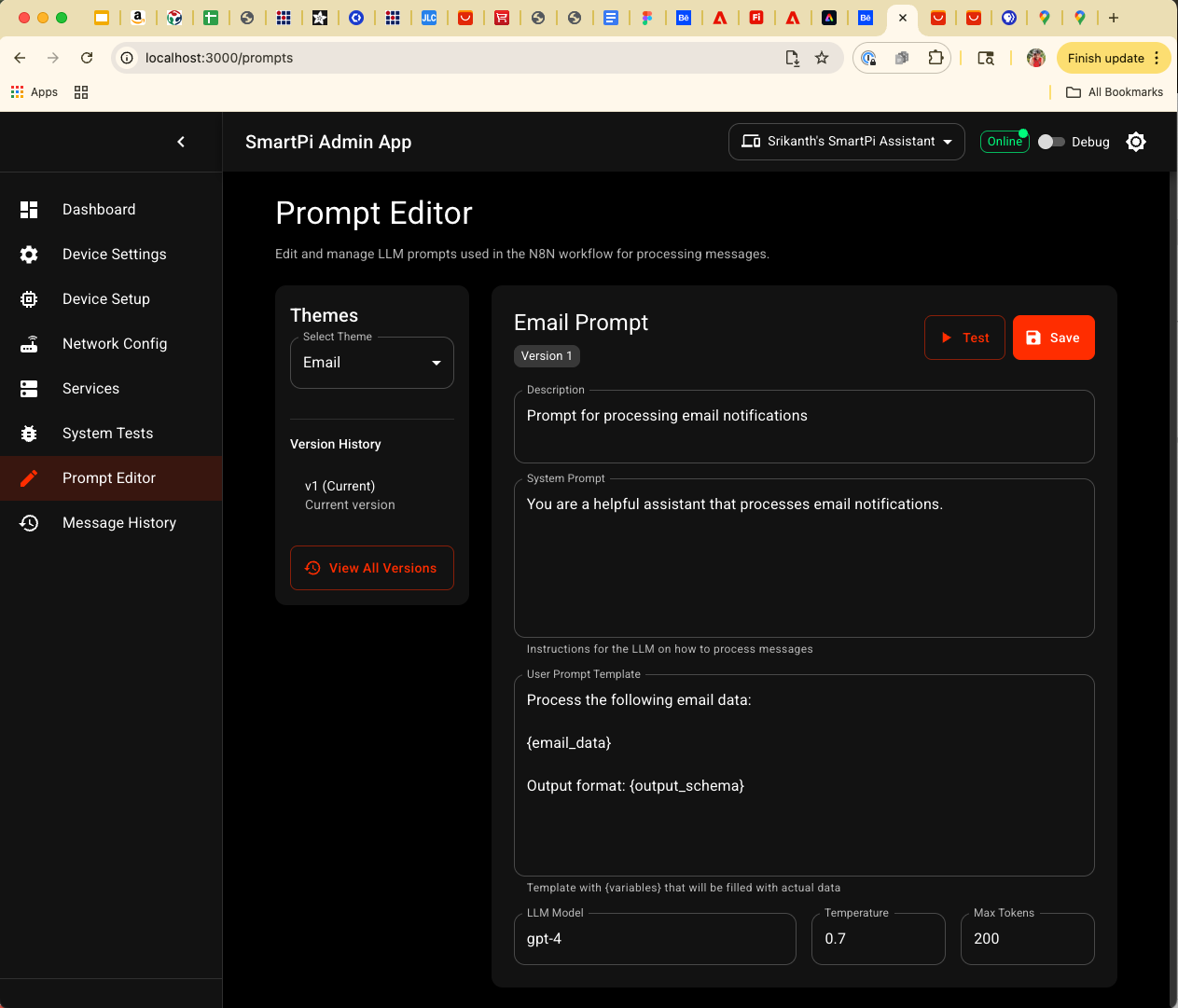
Prompt Editor: A UI for iterating on SmartPi prompts without directly editing JSON files by hand.
Message History
Message History reads the JSON log files written by the MCP bridge. It supports filtering by date, theme, priority, and text search, offers shortcuts like Today/Yesterday/Last 7 Days, and can delete the currently filtered set of messages. The timestamp shown is the original event time (e.g. when an email arrived), not when the message was pushed to the device.
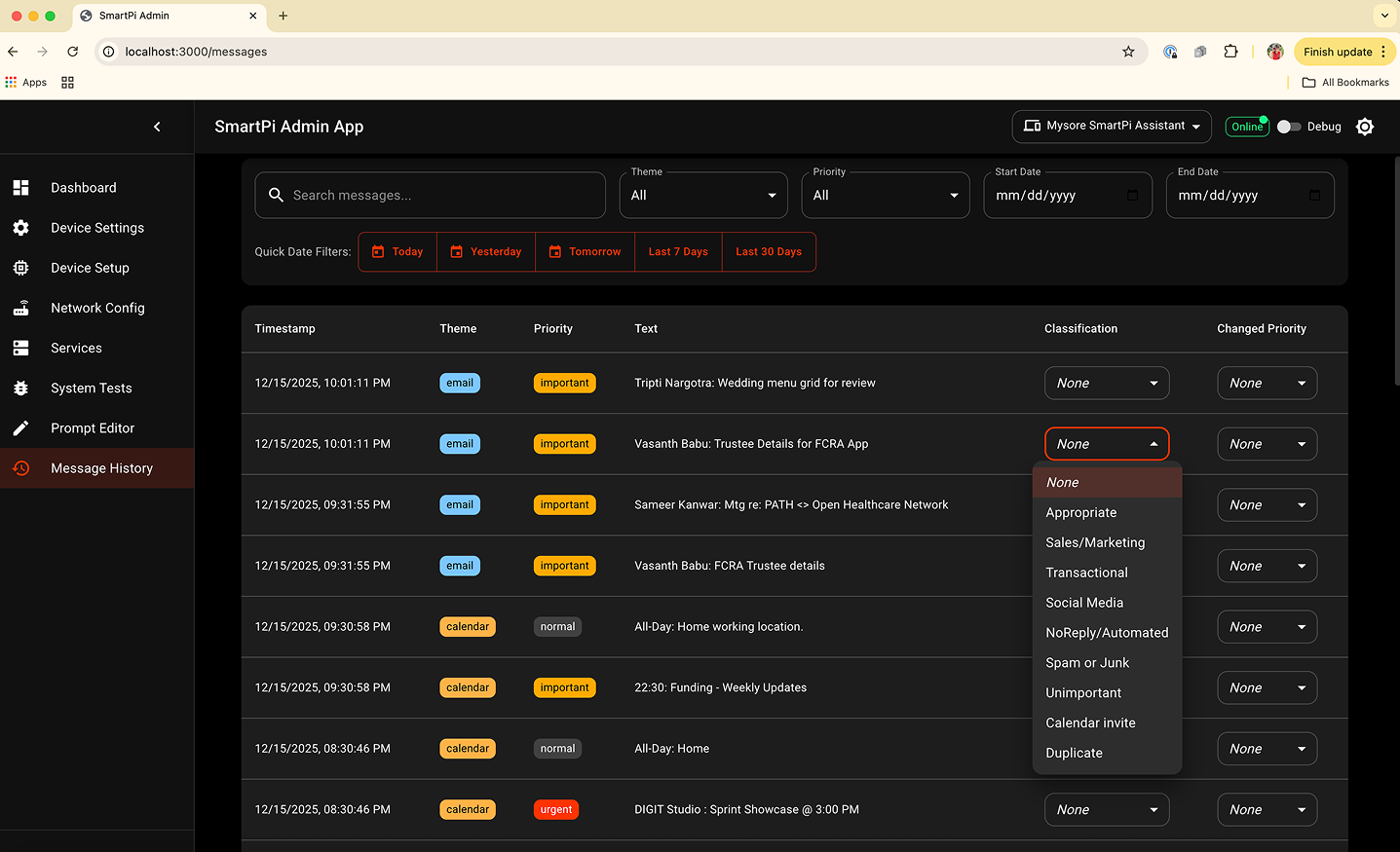
Message History: A powerful debugging view into what SmartPi has been asked to display and when.
05 · Technology Stack
The SmartPi Admin Web App is built as a modern single‑page application with a lightweight local backend for service orchestration.
Frontend
- React + TypeScript: Strongly‑typed component model for complex forms, tabs, and system-test flows.
- Vite: Fast dev server and bundler with hot module reload for rapid iteration on UI changes.
- Material UI (MUI v5): Provides the layout grid, cards, dialogs, tables, tabs, and theming used across all Admin pages.
- React Router: Client‑side routing between Dashboard, Device Settings, Network Config, System Tests, Prompt Editor, and Message History.
- HTTP client (fetch/Axios): Typed API layer that talks to the Node.js service‑manager and the SmartPi bridge proxy endpoints.
Backend & Integration
- Node.js Service Manager: Small Node/Express-style process that starts/stops NGROK, the MCP bridge server, and the Vite dev server, and exposes their status via JSON APIs.
- SmartPi MCP Bridge: Python/FastAPI server that the Admin App reaches through a local proxy to push messages, query status, and fetch logs from the Pico W device.
- File System Access + localStorage: Used (where supported) for selecting
SMARTPI_ROOT, caching user preferences, and storing prompt or feedback state.
Developer Workflow
- Local dev: Vite dev server on port 3000, Node service‑manager, and the SmartPi bridge all controlled from the Services page so everything can be started/stopped from the UI.
- Configuration‑driven: The same Admin UI can point at different Pico W devices and networks simply by changing the Network Config and Device Setup entries.